From OCR to Accounting Intelligence
BillBjorn AutoCode understands bookkeeping context, not just invoice text
Invoice automation has already made data entry faster.
For years, OCR apps have helped businesses scan documents, extract invoice fields, and reduce manual typing. That was an important first step, but bookkeeping does not stop when invoice text has been read.
Bookkeepers still need to understand:
- what was purchased
- which items belong together
- how invoice items should become accounting lines
- how costs should be categorised
- which accounting codes should be used
- what needs to be reviewed before posting to Xero
That is the gap BillBjorn AutoCode is designed to close.
AutoCode uses AI Matching Hints to help turn messy invoice data into structured, review-ready accounting allocations. Users define the accounting groups they want, then AutoCode uses those hints, invoice context, and the customer’s Xero accounting structure to categorise invoice lines by meaning, not just by exact text.
The innovation behind AutoCode is that it does not treat invoice lines as isolated OCR output. It combines extracted invoice data, line-item context, user-defined accounting intent, and Xero-connected accounting settings to prepare grouped accounting lines for review.
It helps move invoice automation from:
reading documents
to:
understanding accounting intent
The next step in bookkeeping automation
Traditional invoice OCR can extract:
- supplier names
- invoice numbers
- dates
- totals
- tax amounts
- line item text
That saves time, but it still leaves bookkeepers with manual interpretation work.
They still need to:
- interpret unclear invoice lines
- split mixed purchases
- decide which account codes apply
- create grouped accounting lines
- correct inconsistent descriptions
- prepare clean transactions for Xero
AutoCode is designed to reduce that review burden.
It does not just capture invoice data. It helps organise invoice meaning into accounting-ready structure.
The key difference is intent-based matching. Instead of forcing users to maintain long lists of exact words and phrases, AutoCode lets users guide the AI with simple matching hints that describe what each accounting category means.
From unstructured invoice text to accounting-ready data
AutoCode helps transform invoice review from manual interpretation into AI-assisted bookkeeping.
| Traditional OCR | BillBjorn AutoCode |
|---|---|
| Reads invoice text | Understands invoice context |
| Extracts fields | Interprets accounting meaning |
| Captures line items | Creates grouped accounting lines |
| Relies on rules, templates, or exact matches | Uses AI Matching Hints to interpret intent |
| Leaves coding decisions to the user | Prepares review-ready accounting allocations |
| Automates data entry | Reduces manual interpretation and review work |
This is the shift from OCR extraction to accounting intelligence.
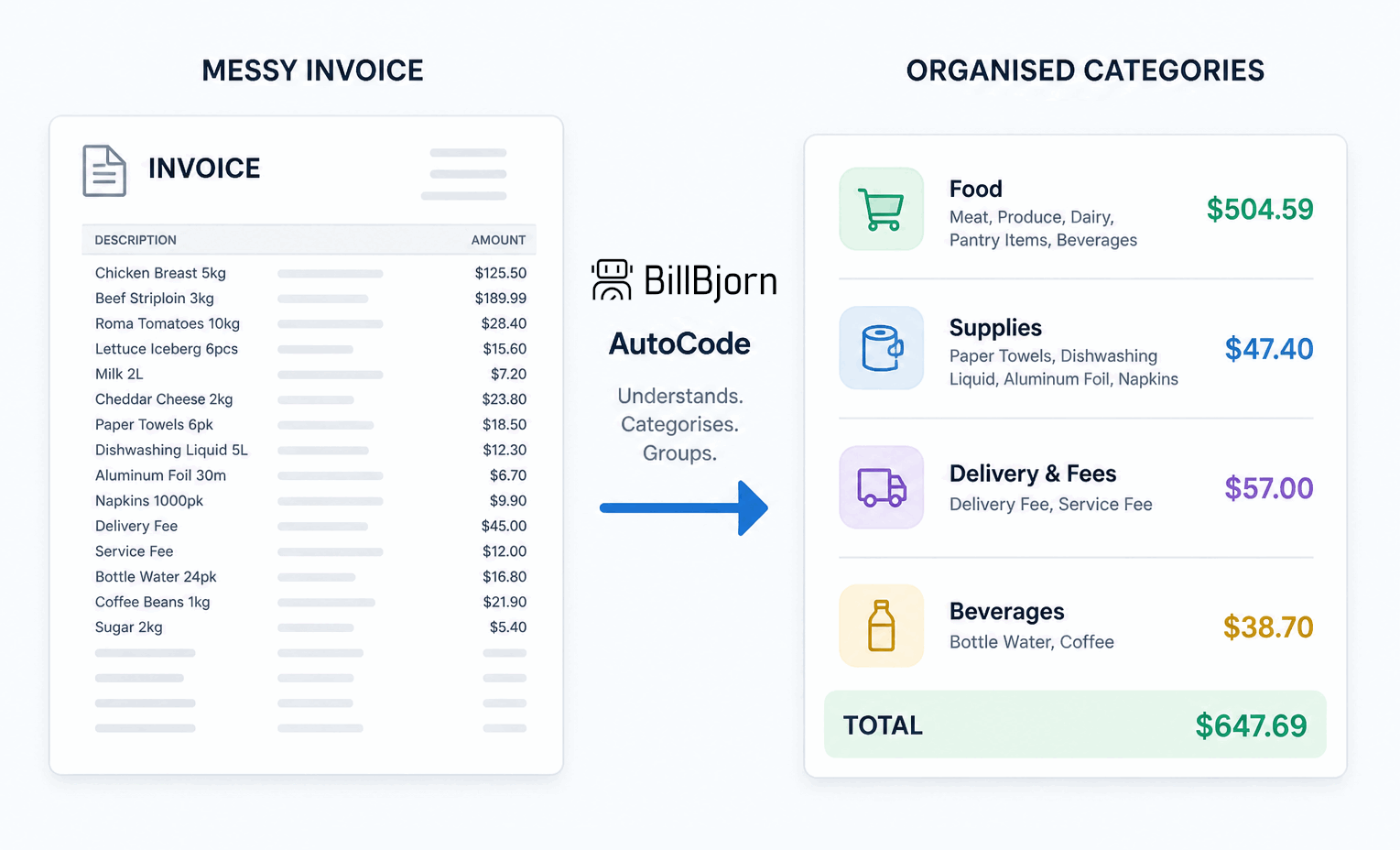 From invoice chaos to accounting intelligence
Messy invoices become organised accounting categories
Real invoices are rarely perfect.
A single supplier invoice might include:
- office supplies
- cleaning products
- freight
- equipment
- consumables
- repairs
- mixed tax treatments
- unclear line descriptions
Traditional automation often treats each line as plain text.
AutoCode looks at the invoice in context and helps identify what each line actually represents from a bookkeeping perspective. It can categorise related items, create grouped accounting lines, prepare cleaner accounting allocations, and make the invoice faster to review before it reaches Xero.
For example, a cafe supplier invoice might include coffee beans, milk, takeaway packaging, cleaning products, and delivery charges. Instead of leaving those as separate raw invoice lines for the bookkeeper to interpret manually, AutoCode can help group them into categories such as Food, Packaging, Cleaning Supplies, and Freight. Each group can then be mapped to the appropriate Xero account, tax rate, and tracking category for review.
The result is a more structured, review-ready invoice before it reaches Xero.
AI Matching Hints: guide the AI by intent, not exact text
Many automation tools depend on exact descriptions, supplier rules, or long keyword lists.
That works when invoices are predictable, but real supplier descriptions change. The same category might appear as different invoice lines from week to week.
For example, a traditional rule might need separate matches for:
- bread rolls
- milk
- coffee beans
- sandwiches
- catering
- fresh produce
With AutoCode, the user can create an accounting group and give it a simple AI Matching Hint such as:
food
AutoCode can then use that intent to recognise related invoice lines, even when the exact wording has not been configured before.
The user still controls the accounting structure:
- which groups exist
- which accounts they map to
- which tax rates apply
- which tracking categories should be used
This creates a practical middle ground between rigid rules and black-box automation. The AI helps with repetitive interpretation, while the user defines the accounting intent and reviews the result.
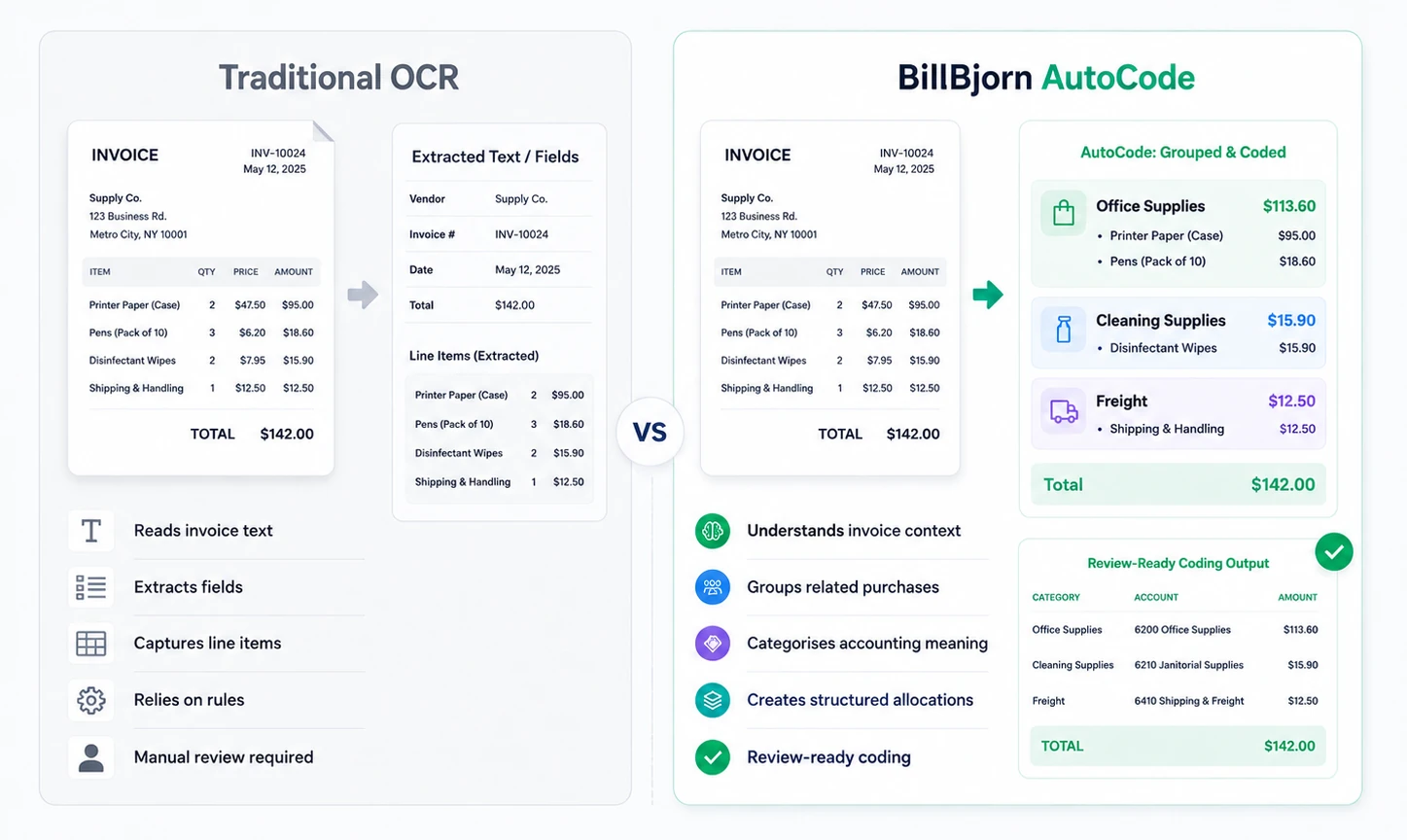 Traditional OCR vs AutoCode
AutoCode in action
A supplier invoice may contain several types of purchases in one section.
Instead of forcing the user to manually split, group, and code each item, AutoCode helps detect the structure behind the invoice.
Step 1: Read the original invoice
BillBjorn captures the invoice and extracts the relevant data.
Step 2: Understand the bookkeeping context
AutoCode analyses the line items, surrounding invoice information, and AI Matching Hints to identify accounting intent.
Step 3: Create grouped accounting lines
Similar items are grouped into accounting categories with suggested accounts, tax rates, tracking categories, and amounts.
Step 4: Prepare review-ready coding
The invoice is presented with structured allocations that can be reviewed, approved, and sent to Xero.
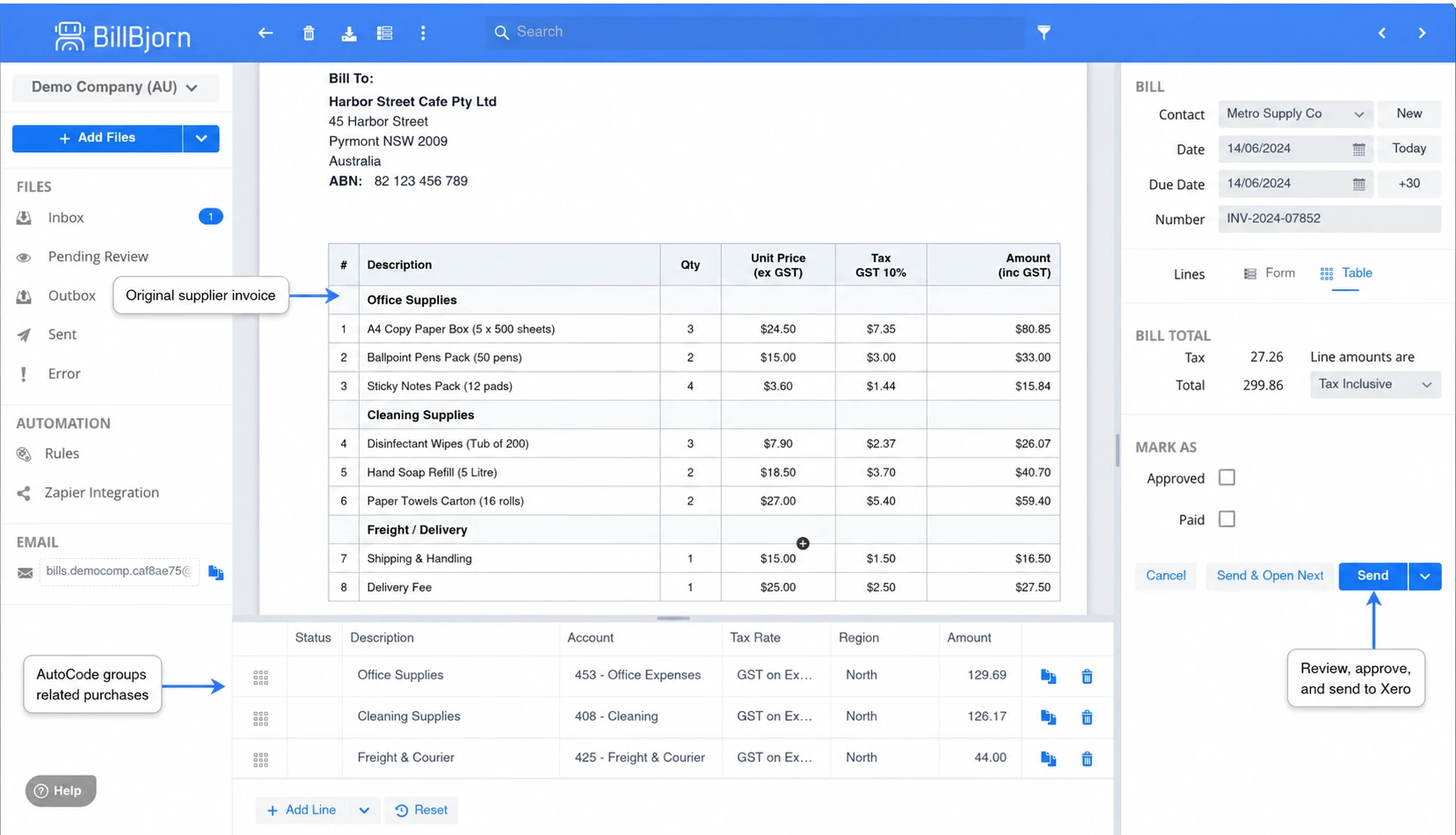 BillBjorn AutoCode review screen
Built for real bookkeeping workflows
AutoCode is designed for the daily work accountants and bookkeepers actually do.
It helps with:
- mixed supplier invoices
- repetitive coding work
- unclear invoice descriptions
- grouped accounting lines
- recurring supplier patterns
- invoice review consistency
- categories that need semantic matching rather than exact text matching
The goal is not to remove human oversight. The goal is to reduce routine judgement calls so bookkeepers can review faster and focus on higher-value work.
The long-term goal is review by exception: AI handles repetitive interpretation, while users focus on the decisions that still need judgement.
AI-assisted bookkeeping, with the user in control
AutoCode is practical AI for accounting workflows.
It assists the user by suggesting structured coding, but the final review stays with the accountant, bookkeeper, or business owner.
AI Matching Hints make this practical. The user provides the accounting intent, and AutoCode applies that intent across invoice lines for review.
This creates a balanced workflow:
- AI handles repetitive interpretation
- the user stays in control
- invoices are easier to review
- Xero receives cleaner accounting data
It is automation designed to support professionals, not replace them.
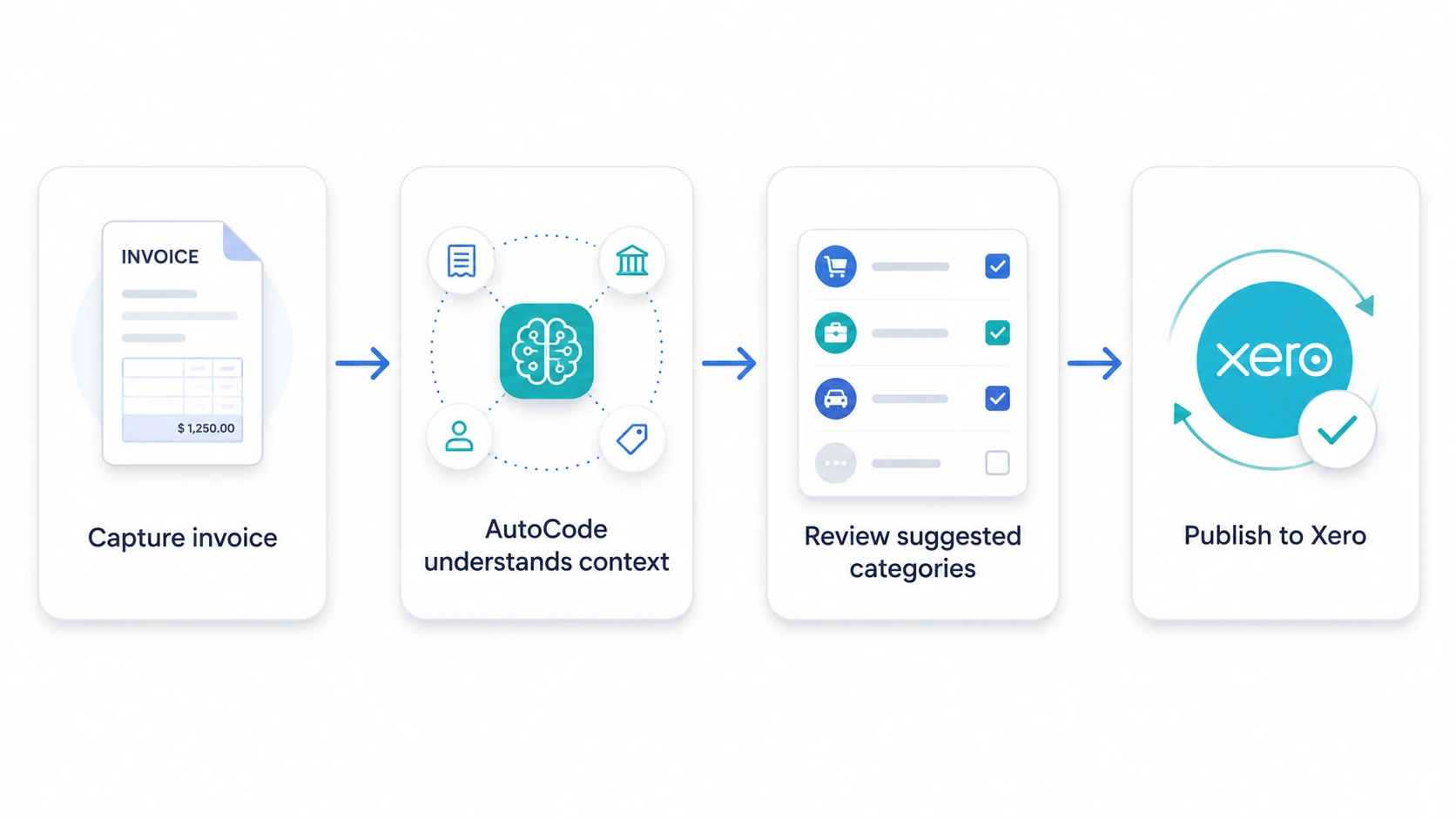 AutoCode workflow to Xero
Xero-native accounting automation
BillBjorn is built to work closely with Xero.
When connected to Xero, BillBjorn can use:
- contacts
- chart of accounts
- tax rates
- tracking categories
- supplier information
This allows AutoCode suggestions to fit naturally into the user’s Xero workflow.
For example, a user can define a group such as Food, Cleaning Supplies, or Freight, map it to the right Xero account and tax treatment, and use AI Matching Hints to help AutoCode recognise matching invoice lines.
AutoCode suggestions are not generic categories. They are prepared against the user’s actual Xero accounting structure, including the accounts, tax rates, and tracking categories already used by the business.
After review, transactions can be sent to Xero with the original source document attached.
The result is a cleaner end-to-end workflow:
- Capture the invoice
- Understand the accounting context
- Review the suggested coding
- Publish to Xero
- Keep the source document attached for audit support
Why this matters
The future of invoice automation is not just faster OCR.
It is software that understands more of the bookkeeping workflow.
AutoCode helps reduce:
- manual line review
- manual categorisation
- inconsistent coding
- invoice processing friction
- cognitive load for bookkeeping teams
For small businesses, this means less time spent on admin.
For bookkeepers and accountants, it means more scalable invoice processing and more consistent coding workflows.
BillBjorn started with a simple goal:
make invoice and receipt processing faster, easier, and more accurate.
AutoCode extends that goal into the next generation of bookkeeping automation. Instead of only extracting invoice data, BillBjorn helps interpret it. Instead of requiring exact-match rules for every possible supplier description, BillBjorn lets users guide categorisation with intent-based AI Matching Hints. Instead of only reducing typing, BillBjorn helps reduce manual interpretation and review work.
That is the evolution from OCR to accounting intelligence.
See AutoCode in BillBjorn
AutoCode is available inside BillBjorn for invoice review and coding workflows.
Use it to:
- organise invoice lines
- create grouped accounting lines
- guide categorisation with AI Matching Hints
- prepare structured accounting allocations
- reduce repetitive review work
- publish cleaner invoices to Xero

Frequently asked questions
Here are answers to common questions about BillBjorn AutoCode and how it helps turn invoice automation into AI-assisted bookkeeping intelligence. For more details, visit our knowledge base.
What is BillBjorn AutoCode?
BillBjorn AutoCode is an AI-powered bookkeeping feature that understands invoice context, categorises invoice lines, creates grouped accounting lines, and prepares accounting-ready allocations for review and export.
How is AutoCode different from traditional OCR?
Traditional OCR focuses on reading text and extracting fields. AutoCode goes further by interpreting bookkeeping context, identifying accounting intent, grouping related invoice lines, and preparing structured allocations for Xero review.
Can AutoCode handle messy or mixed invoice lines?
Yes. AutoCode is designed for real-world invoices where a single invoice may contain different types of purchases. It can identify related items, group them by accounting category, and prepare cleaner invoice coding.
Does AutoCode replace the accountant or bookkeeper?
No. AutoCode is designed to assist accountants and bookkeepers by reducing repetitive coding and review decisions. Users remain in control and can review suggested allocations before sending them to Xero.
How does AutoCode work with Xero?
BillBjorn connects with Xero and uses Xero's accounts, tax rates, contacts, and tracking categories to prepare invoices for accurate review and export. Source documents are attached when transactions are published to Xero.
What are AI Matching Hints?
AI Matching Hints are short phrases that describe the accounting intent of a category. Instead of maintaining long exact-match keyword lists, users can guide AutoCode with hints such as food, freight, cleaning, or office supplies.