AI Invoice Scanning for QuickBooks Online
Supplier bills that enter themselves in QuickBooks Online.
BillBjorn captures, codes and sends routine bills to QuickBooks Online using your rules. Bills that need attention are held for review, with a clear reason why.
- No typing: supplier, dates, number, totals and line items
- Coded to your QuickBooks accounts, with the original PDF attached
- Every bill checked before it reaches QuickBooks
No credit card required · Auto-Send included in the trial · Cancel anytime
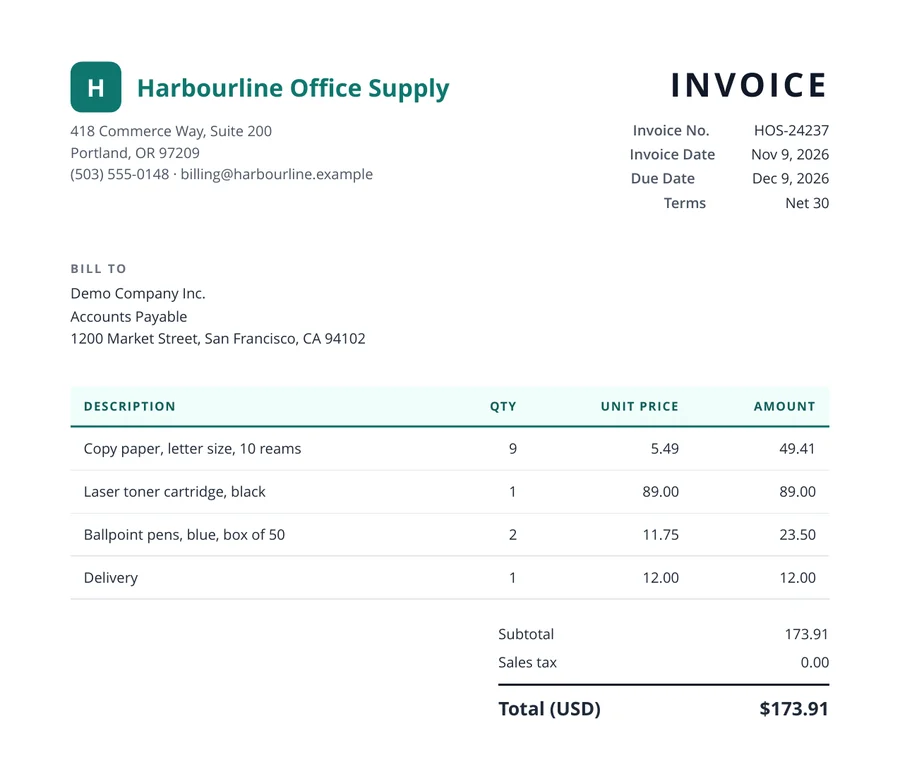
- Read by AI
- Coded to your accounts
- Safety-checked
- Sent to QuickBooks
 Sent by Auto-Send · 0 clicks
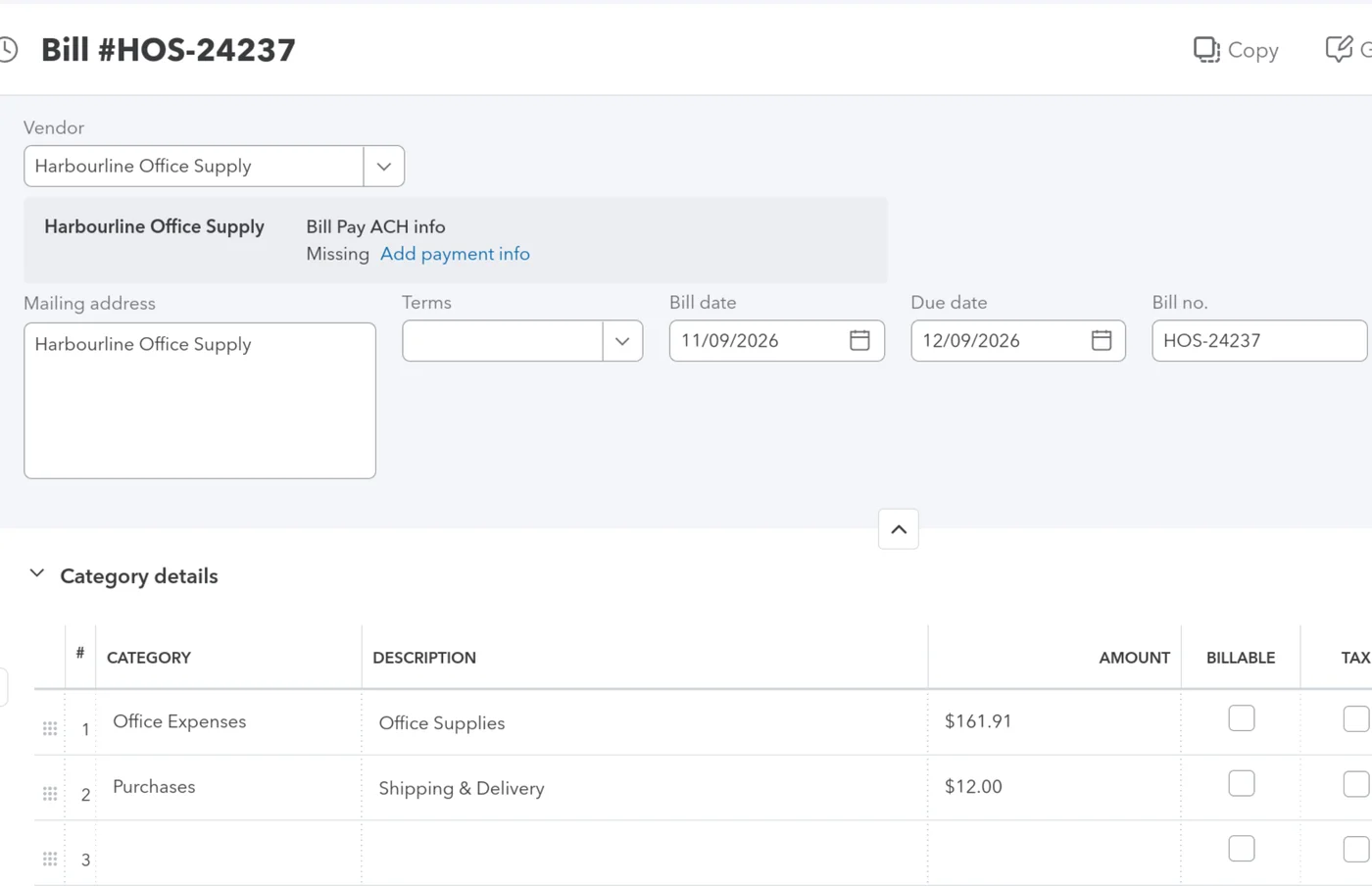

Automated QuickBooks Online Data Entry
BillBjorn makes scanning invoices into QuickBooks Online quick and simple. Automate your bill and receipt processing to eliminate manual effort. Experience fast, accurate, and seamless data entry today!
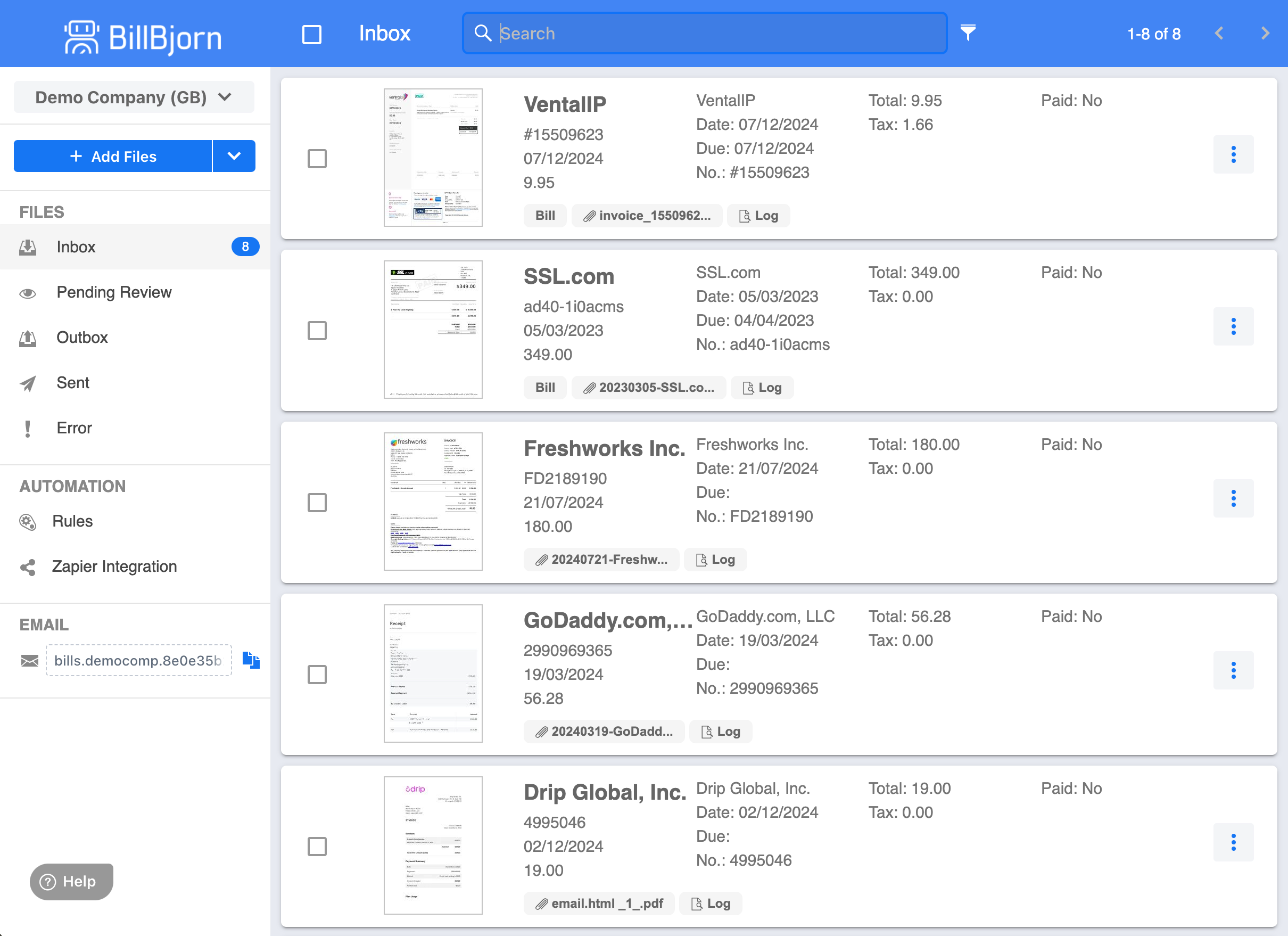
- Seamless Automation
- Set it and forget it! Configure your data entry rules once, and BillBjorn automates the process. Invoices and receipts flow in automatically, letting you focus on growing your business with QuickBooks Online.
- Blazing-Fast Processing
- Speed matters. Process invoices and receipts in under 60 seconds on average—your time is too valuable to waste.
- Unmatched Accuracy
- Get it right the first time. Customizable invoice templates and intelligent data entry rules ensure every detail is perfectly synced into QuickBooks Online.
- Ironclad Security
- Your data stays safe. With fully automated processing, there’s no human review or outsourcing, giving you complete peace of mind.
- Budget-Friendly
- Automation done right means big savings. By eliminating manual data entry, we pass the cost savings directly to you.
- Effortless Integration
- Simplify your workflow. Export transactions directly to QuickBooks Online or other partner accounting software, making your financial management stress-free.
Trusted QuickBooks Online Partner Add-On
Connect BillBjorn to QuickBooks Online
Connecting BillBjorn to your cloud-based accounting software is effortless. Your data is seamlessly exported, and account names, tax rates, and tracking categories sync automatically - no manual setup required. Click the connect button next to your accounting software now and start automating your invoice data entry within minutes!
QuickBooks Online
QuickBooks Online by Intuit offers an intuitive way to manage your business finances. It organizes your financial data in one accessible place and simplifies bookkeeping. Combine it with BillBjorn for hassle-free QuickBooks Online invoice scanning and streamlined accounting.
Connect to QuickBooks OnlineRead QuickBooks Online ReviewQuickBooks Online Enabled App
Snap QuickBooks Online Receipts on the Go
The BillBjorn mobile app makes scanning invoices into QuickBooks Online effortless. Snap a picture of your receipts, upload them to the cloud, and sync directly with QuickBooks Online - all from your smartphone.


Put Your QuickBooks Online Bookkeeping on Autopilot
Simplify your bookkeeping and save hours with our smart automation. Reduce errors, streamline your workflow, and keep your QuickBooks Online records perfectly organized with ease.
Start Your Free TrialScan Invoices into QuickBooks Online Effortlessly with BillBjorn
BillBjorn reads supplier bills and receipts with AI and creates them as bills in QuickBooks Online, so you can scan invoices into QuickBooks Online without typing them in. From the Small plan, Auto-Code reads and codes every line item, and on the Medium and Large plans, Auto-Send sends routine bills without review after checking each one; anything unusual is held with the reason. That turns QuickBooks Online invoice processing into checking the exceptions, not every bill.

Bills, receipts and PDF invoices: how they get in
- PDF invoices from email: forward them to your company's own BillBjorn email address, or drag them into the inbox.
- Paper bills and receipts: snap a photo with the BillBjorn app for iPhone and Android, or scan a stack with a desktop scanner through Scan2Invoice.
- What the AI reads: the vendor, bill date, due date, invoice number, totals, tax and every line item. It works like OCR, but it understands the layout of each bill, so there are no templates to set up.
- What lands in QuickBooks Online: a bill, an expense or a vendor credit, coded to your own accounts, tax codes and classes, with the original document attached.
Comparing options first? See the best invoice scanning software for small businesses or the best invoice scanning apps for QuickBooks Online.
Attach Documents to QuickBooks Online Bills and Expenses
Gone are the days of searching through paper piles or computer folders for a specific invoice. With BillBjorn, every document is seamlessly attached to its corresponding QuickBooks Online transaction.
When you upload a bill or receipt, BillBjorn extracts the key details and creates a bill or expense directly in QuickBooks Online. The original file is automatically attached and securely stored on QuickBooks Online servers. Thanks to automatic backups, your documents are safe, secure, and always available.
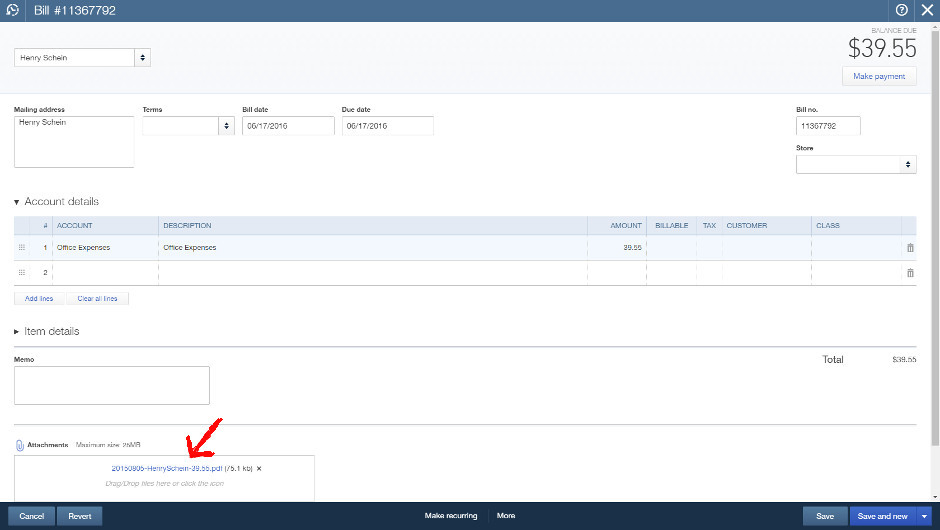 File attached to QuickBooks Online Bill
Key Benefits:
- Instant Access to Invoices: Quickly retrieve original purchase invoices for accountants or tax purposes.
- Simplified Compliance: Stay organized and audit-ready with all documents in one place.
- Paperless Office Potential: Depending on local legislation, you may discard physical receipts once securely stored. Check with your accountant.
Visit our features page to learn more about how BillBjorn improves your workflow.
Manage Cash Flow in Real Time with QuickBooks Online and BillBjorn
Cash flow is vital for any business. BillBjorn minimizes the delay between receiving an invoice and recording it in QuickBooks Online, providing real-time insights into your financial health.
Real-Time Invoice Scanning for Immediate Insights
When you upload an invoice to BillBjorn, it extracts essential details and instantly creates a bill in QuickBooks Online. Unlike slower solutions, BillBjorn ensures your data is available immediately, enabling informed decisions based on up-to-date information.
Prioritize Payments with Ease
After syncing your bills to QuickBooks Online, the "Pay Bills" feature allows you to:
- Identify and prioritize urgent payments.
- Plan cash flow to avoid penalties.
- Negotiate better terms with suppliers.
Explore BillBjorn pricing to find the plan that fits your needs.
 Sort Bills by Due Date in QuickBooks Online
Auto-Send Bills to QuickBooks Online Without Reviewing Each One
Scanning saves you the typing. Auto-Send saves you the review. Switch it on for your regular suppliers, and every bill runs through 15 checks before it goes anywhere: the supplier already exists in QuickBooks Online, the totals add up, accounts and tax codes are still valid, the amount is under your limit, and it isn't a duplicate.
Bills that pass go straight into QuickBooks Online, without anyone clicking Send. Anything unusual is held in BillBjorn, and you get an email explaining why. Auto-Send is included on the Medium and Large plans.
Why Choose BillBjorn for QuickBooks Online?
BillBjorn enhances the invoice scanning process for QuickBooks Online, saving time and reducing manual errors.
Key Features of BillBjorn:
- Automated Invoice Scanning: Eliminate manual data entry and let BillBjorn handle it.
- Secure Document Storage: Every uploaded invoice is attached to the correct QuickBooks Online transaction.
- Real-Time Syncing: Process invoices and expenses instantly.
- Paperless Options: Reduce clutter and work toward a digital office environment.
Key Features of QuickBooks Online:
- Comprehensive Financial Management: Track sales, expenses, and bank transactions in one place.
- Real-Time Business Insights: Generate profit and loss reports and track performance.
- Banking Integration: Sync with bank accounts automatically.
- Scalable Features: Integrate with tools like BillBjorn for personalized automation.
For more details, visit Intuit’s QuickBooks Online site.
How to Get Started
- Connect Your Accounts: Link BillBjorn to QuickBooks Online quickly and securely.
- Upload Your Documents: Start uploading invoices and receipts.
- Automate Your Workflow: Watch as bills are instantly created in QuickBooks Online, complete with attached documents.
Start Your Journey
Transform the way you scan invoices into QuickBooks Online with BillBjorn. Begin your 30-day free trial today. No credit card required!
Get Started for FreeAbout QuickBooks Online
QuickBooks Online is the top accounting software for small businesses, offering a user-friendly interface and robust features to simplify financial management.
Benefits of QuickBooks Online:
- Record sales and track payments.
- Monitor expenses and generate detailed reports.
- Automatically sync with banks and credit cards.
- Scale seamlessly with integrations like BillBjorn.
When paired with BillBjorn, QuickBooks Online offers unmatched efficiency for small business accounting.
Take the Next Step
Optimize your workflow, improve cash flow management, and simplify accounting tasks. BillBjorn and QuickBooks Online make it easier than ever to manage your finances.
Try BillBjorn today and experience the benefits of scanning invoices into QuickBooks Online with ease!
Rated 4.8 Stars: Why BillBjorn is a QuickBooks Online Favorite!
BillBjorn is a top-rated app on the QuickBooks Online App Store , with 4.8 out of 5 stars from 59 glowing reviews. Accountants, bookkeepers, and small business owners praise its simplicity, efficiency, and transformative impact. Explore their stories to see how BillBjorn can elevate your workflow!
Added the level of simplicity and transparency we were looking for. Very accurate, alleviated the manual entry into QBO without all the bells and whistles that we did not need. Works great.
We have tested multiple similar systems but this one seems to work easier and faster than the others. The price is also very fair.
Great app, thank you. A lot more accurate than QBO’s built-in receipt processing function, and way cheaper than Dext. Try it and you won't look back!
Even as a standalone product it would be great, but its integration with QuickBooks Online elevates it to a must-have for any business. It knows your customers and codes through the QBO integration, is intuitive to use, and makes the inputting process of invoices so much faster and more accurate. Highly recommend!
OwenbeeIt is good and saves time. Works well. Some minor adjustments have to be done manually, but totally worth the purchase. Easy to use. Good integration, works well.
IsoraRentalsScanning in our invoices and putting them to either bills or expenses. Being able to add detail as needed. It's easy, accurate, and a great resource to save time and increase accuracy in your accounting processes.
More comparisons
- Best invoice scanning apps for QuickBooks Online
- Best invoice scanning software for small businesses
- Best Dext alternatives

Frequently asked questions
Here are answers to common questions about our QuickBooks Online integration. For more details, check our knowledge base.
What is BillBjorn, and how does it integrate with QuickBooks Online?
BillBjorn is an automation tool that simplifies invoice and receipt processing by syncing them directly with QuickBooks Online. It uses advanced OCR technology to extract and upload data, saving time and reducing errors.
How do I scan an invoice or receipt into QuickBooks Online?
Upload your invoices or receipts to BillBjorn, and it will automatically extract and sync the details into QuickBooks Online. Use the desktop or mobile app for instant scanning and syncing.
How do I connect BillBjorn to my QuickBooks Online account?
Log into BillBjorn, go to the integrations section, and securely authorize QuickBooks Online. The connection process is quick, seamless, and secure.
What types of transactions can BillBjorn export to QuickBooks Online?
BillBjorn exports Bills, Expenses, and Vendor Credits directly to QuickBooks Online, ensuring your financial records are accurate and well-organized.
Does BillBjorn support custom categories in QuickBooks Online?
Yes, BillBjorn syncs with your QuickBooks Online custom categories, allowing for personalized transaction organization and simplified financial management.
Can I use the BillBjorn mobile app to send receipts to QuickBooks Online?
Absolutely! Use the BillBjorn mobile app to snap pictures of receipts, upload them to the cloud, and sync them with QuickBooks Online in seconds.
Is my data secure with BillBjorn and QuickBooks Online?
Yes, BillBjorn uses advanced encryption and secure processing to protect your data. No sensitive information is ever shared or exposed.
How does BillBjorn save time when scanning invoices into QuickBooks Online?
BillBjorn automates data extraction, entry, and syncing, processing invoices and receipts in seconds. This eliminates manual data entry and reduces the risk of errors.
What are the benefits of using BillBjorn with QuickBooks Online?
BillBjorn automates invoice scanning, reduces bookkeeping time, ensures accurate records, and integrates seamlessly with QuickBooks Online to simplify your financial workflow.