Best
Bill Capture Apps for Xero in 2026
Trusted Partner App for Leading Cloud-Based Accounting Software


TL;DR: Xero's Smart Document Capture is free and fine for a handful of bills, but every bill arrives as a draft to approve. Hubdoc is cheap and simple but captures key fields only. Dext and AutoEntry are full-featured but charge extra for line items. BillBjorn can send bills to Xero approved on every plan, and on Medium and Large adds line items and Auto-Send for routine bills, checked first. ApprovalMax is the pick if you need formal multi-step approvals.
Last updated: November 14, 2026. Prices are list prices in USD unless stated, excluding tax, from each vendor's website on November 13, 2026.
A note on bias: BillBjorn wrote this article, and BillBjorn is on the list. We used each vendor's own pricing and help pages, and we say where another tool fits better.
Xero bill capture apps at a glance
| App | Best for | Starting price | Line items | Bills arrive in Xero as | Who decides a bill skips review |
|---|---|---|---|---|---|
| BillBjorn | Small businesses and bookkeepers | US$6.50/mo (US$5 billed yearly) | Medium and Large (Auto-Code) | Draft or Approved, per supplier rule | Each bill is checked (Auto-Send, Medium and Large) |
| Xero Smart Document Capture | A few bills a month | Included with Xero | Not stated for bills | Draft | Nobody: every bill is approved by hand |
| Hubdoc | Key fields only, lowest cost | Included with Xero, or US$12/mo | No | Draft, Awaiting Approval or Awaiting Payment | The supplier switch (auto sync) |
| Dext | Practices needing a full platform | US$31.50/mo, 250 docs, 5 users | Add-on from US$20.50/mo | Depends on your settings | The supplier switch (auto-publish) |
| AutoEntry | Bank statements, credit pools | US$13/mo, 50 credits | 2 credits per invoice | Depends on your settings | The supplier switch (Auto-Publish) |
| Datamolino | UK businesses wanting approvals | £17/mo, 100 docs | Optional setting | Not stated | Approval workflow |
| ApprovalMax | Multi-step approvals | Per organisation, by volume | Capture included | After approval | Your approval workflow |
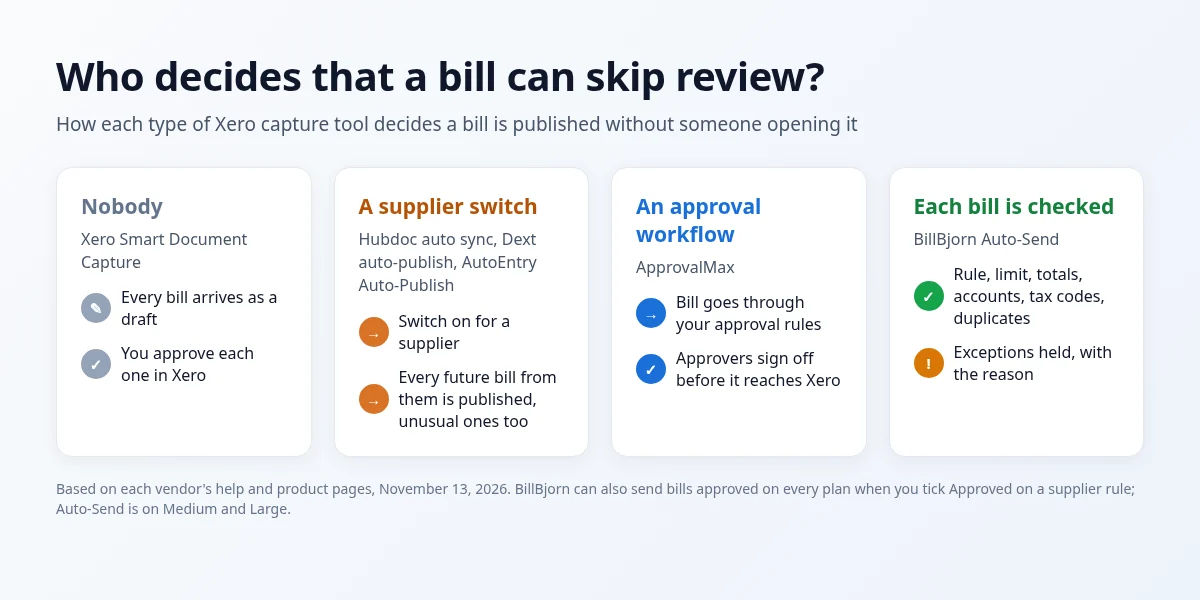 Who decides that a bill can skip review?
How we picked and ranked them
Every tool here sends supplier bills to Xero. We compared them on:
- Cost at 50 to 1,000 bills a month
- Line items: included, extra, or not available
- How bills arrive in Xero: as drafts to approve, or approved and ready to pay
- What stops a wrong bill from being published automatically
- Setup effort for a small team
Drafts vs approved: why it matters in Xero
In Xero, a Draft bill isn't in your reports or in what you owe. Only an approved bill (Awaiting Payment) counts, and only then can it be paid and matched to the bank.
If a capture tool sends drafts, routine bills get looked at twice: once in the capture tool, once to approve in Xero. At a few hundred bills a month, that's a job. See Xero draft bills vs Awaiting Payment for the details.
1. BillBjorn: best for small businesses and bookkeepers
BillBjorn reads supplier bills and receipts with AI and sends them to Xero, as well as QuickBooks Online, Sage Accounting, MYOB Business and FreshBooks.
What stands out
- Line items with Auto-Code on Medium and Large, counted as one document.
- Approved bills, on every plan. Tick Approved on a supplier rule and bills from that supplier land in Xero as Awaiting Payment. You review once, in BillBjorn, and never visit the Draft tab.
- Auto-Send (Medium and Large) sends routine bills without anyone opening them. Each bill is checked first: the supplier exists in Xero, the totals add up, the accounts and tax codes are valid, the amount is under your limit, and it isn't a duplicate. Anything that fails is held, with an email explaining why.
- Auto-Code (Medium and Large) splits mixed invoices across accounts.
- Email address for each company, mobile app, and desktop watched folders with Scan2Invoice.
- Xero Global App Awards finalist in 2025 and 2026.
Pricing: from US$6.50/month for 50 documents (US$5 billed yearly), up to US$65 for 2,500 (US$50 billed yearly). One company and unlimited users on every plan. 30-day free trial, no credit card. See BillBjorn pricing.
Where it falls short: no bank statement extraction, no expense claims, and no multi-step approval workflows. Auto-Send and Auto-Code need Medium or Large.
2. Xero Smart Document Capture: best for a few bills a month
Xero's own capture reads receipts, invoices and statements from the Xero app, your Xero email address, or drag and drop. It's included on every Xero small business plan and spots duplicate uploads.
Where it falls short:
- Bills are created as drafts. Approving straight to Awaiting Payment is something Xero users have asked for on Xero's product ideas forum, not something it does today.
- Xero's US Simple and Early plans limit how many bills you can enter (3 on Simple, 5 on Early). Growing (US$59 a month) adds "automate bill entry and track bills".
Choose it if you have a handful of bills a month and don't mind approving each one.
3. Hubdoc: best for key fields at the lowest cost
Hubdoc is owned by Xero. Xero's partner pages say it's included with Xero business plans, and it's also sold standalone for US$12 a month with a 30-day free trial.
What stands out: auto sync per supplier, publishing as Draft, Awaiting Approval or Awaiting Payment, bank statement capture, and sync with Xero and QuickBooks Online.
Where it falls short: it captures key fields (supplier, date, total, invoice number), not line items. When auto sync is on for a supplier, every bill from that supplier is published, including an unusual one.
Choose it if most bills go to one account and you want a low-cost route. See BillBjorn vs Hubdoc.
4. Dext: best for practices that need a full platform
Dext (formerly Receipt Bank) covers receipts, invoices, expense claims, supplier and bank statements, document storage and practice tools.
Pricing: US business plan US$31.50 a month (US$25.21 billed yearly) for 250 documents and 5 users. Line item extraction is an add-on from US$20.50 a month or US$0.50 per document. Practice pricing is quoted per practice. 14-day free trial.
Where it falls short: the cost if you only need bill capture, with line items charged on top.
Choose it if you'll use the wider platform. See BillBjorn vs Dext and our Dext alternatives roundup.
5. AutoEntry: best for bank statements and credit pools
AutoEntry, owned by Sage, works on credits: 1 per invoice, 2 with line items, 3 per bank statement page. Plans start at US$13 for 50 credits and go up to US$469 for 2,500. Unused credits roll over for 90 days, and Auto-Publish can be switched on per supplier.
Where it falls short: line items double the cost of every invoice.
Choose it if you need statements extracted or work across many accounting packages. See BillBjorn vs AutoEntry.
6. Datamolino: best for UK businesses that want approvals included
Datamolino exports bills to Xero, QuickBooks Online and FreeAgent, includes invoice approvals on every plan, and lets you choose "Totals only" or "Include line items". Business plans are listed in GBP: £17 a month for 100 documents, £29 for 250, £55 for 500, with unlimited users and a 14-day free trial.
Where it falls short: unused credit doesn't roll over, and it lists fewer integrations than Dext or AutoEntry.
7. ApprovalMax: best for multi-step approvals
ApprovalMax is an approval workflow tool for Xero, QuickBooks Online and NetSuite. Its ApprovalMax Capture OCR is included in every plan. Bills go through your approval rules before they reach Xero. Xero plans are priced per organisation by document volume (up to 100, 300 or 500 documents a month) with unlimited approvers and a 14-day free trial.
Where it falls short: it's built around approvals. If the person entering bills is also the person approving them, you're paying for workflow you won't use.
Choose it if bills need sign-off from managers or budget holders before they're recorded.
Which Xero bill capture app should you choose?
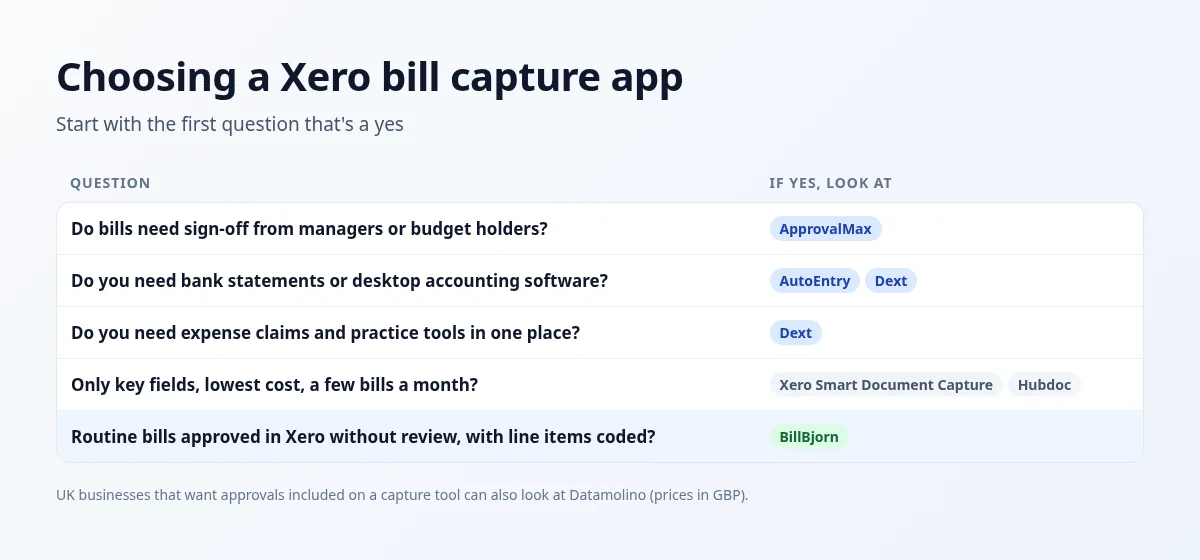 Choosing a Xero bill capture app

Routine Bills, Approved in Xero
Connect Xero, add a rule for a regular supplier, tick Approved, and send your first bill straight to Awaiting Payment. No credit card required.
Start Your Free 30-Day Trial
Frequently asked questions
Common questions about bill capture apps for Xero. For setup help, visit our knowledge base.
What is the best bill capture app for Xero?
For most small businesses and bookkeepers that want line items and fewer bills to approve, BillBjorn is a strong choice: plans from US$6.50 a month, line items with Auto-Code on Medium and Large, and bills can arrive in Xero already approved on every plan. Xero's own Smart Document Capture is enough at low volumes if you don't mind approving each draft. Hubdoc suits Xero users who only need key fields. ApprovalMax suits businesses that need multi-step approval workflows.
Does Xero have built-in bill capture?
Yes. Xero's Smart Document Capture reads receipts, invoices and statements from the Xero app, your Xero email address or drag and drop, and is included with every Xero small business plan. Bills it creates are drafts that you approve one by one.
Is Hubdoc still included with Xero?
Xero's partner pages say Hubdoc is included with Xero business plans (Early, Growing and Established in the US). Hubdoc is also sold on its own for US$12 a month. As of November 2026, Hubdoc is still sold and still syncs to Xero.
Which Xero apps create approved bills instead of drafts?
Hubdoc can publish as Draft, Awaiting Approval or Awaiting Payment. BillBjorn can send bills as Approved (Awaiting Payment) on every plan when you tick Approved on a supplier rule, and with Auto-Send on the Medium and Large plans it does so without anyone reviewing routine bills. Xero's Smart Document Capture creates drafts.
Do Xero bill capture apps extract line items?
BillBjorn reads and codes line items with Auto-Code on its Medium and Large plans. AutoEntry charges 2 credits instead of 1 for an invoice with line items. Dext's US business plan offers line items as an add-on from US$20.50 a month. Hubdoc captures key fields only. Datamolino has a line items setting.
Is this comparison neutral?
BillBjorn wrote it, so we're not neutral. We used each vendor's own pricing and help pages, checked on November 13, 2026, and we say where another tool fits better.