BillBjorn vs Hubdoc:
No Review for Routine Bills
Trusted Partner App for Leading Cloud-Based Accounting Software


TL;DR: Xero's built-in Smart Document Capture can only create draft bills, so every bill still needs approving. Hubdoc can publish approved bills automatically, but it decides by supplier, not by bill, and captures only the supplier, date, and total. BillBjorn Auto-Send is the only one of the three that sends routine bills to Xero approved and checks every bill first: 15 checks, including your maximum amount and duplicates. It also reads every line item and works with Xero, QuickBooks Online, Sage, MYOB, and FreshBooks.
The big difference: routine bills that skip review
Capturing the data is only half the job. Someone still has to open each bill, check it, and approve it in Xero. For most bookkeepers, that review is where the time goes.
| Routine bills arrive in Xero as | Who decides a bill can skip review? | |
|---|---|---|
| Xero Smart Document Capture | Draft, to be approved one by one | Nobody: every bill needs approving |
| Hubdoc | Draft, Awaiting Approval, or Awaiting Payment | The supplier switch (auto sync) |
| BillBjorn Auto-Send | Approved (Awaiting Payment), ready to pay | Each bill, after 15 checks |
Xero's built-in capture stops at drafts. On Xero's product ideas forum, users point out that "when Smart Capture creates a bill, it can only be published as a draft", and must then find and approve each bill. Xero's own roadmap (September 2026) lists creating bills as awaiting approval or awaiting payment under "further ahead". (What Draft and Awaiting Payment mean in Xero.)
Hubdoc can skip review, but it trusts the supplier. With auto sync on, every bill from that supplier goes straight to Xero, including the unusual one.
BillBjorn checks the bill, then approves it. With Auto-Send, a bill from a regular supplier goes to Xero approved only if it passes every check: known supplier, totals that add up, valid accounts and tax codes, under your maximum amount, not a duplicate. Anything that fails is held in BillBjorn with the reason, and you get an email. Your Xero bills list shows routine bills ready to pay, and your BillBjorn inbox shows only the exceptions.
You choose the status. Turn on Mark Documents As Approved in your company settings, or tick Approved on a supplier rule, and Auto-Send creates approved bills. Leave it off and they arrive as drafts.
Which tool is right for you?
| Choose BillBjorn if you… | Stay with Hubdoc or Xero's built-in capture if you… |
|---|---|
| Need line items, not just the total | Only need the supplier, date, and total on each bill |
| Have supplier invoices that mix several expense types | Code most bills to a single account |
| Want routine bills in Xero approved and ready to pay, with each one checked first | Are happy to open and approve every bill yourself |
| Use QuickBooks Online, Sage, MYOB, or FreshBooks as well as Xero | Use only Xero and want no extra subscription |
| Want rules, Auto-Code, and Auto-Send reports for each company | Mainly need document storage and bank statement capture |
Hubdoc in 2026: what has changed
Xero acquired Hubdoc in 2018 and later included it in its business plans. Xero's partner pages still say "Hubdoc is included in Early, Growing and Established plans", and Hubdoc's own site still sells a standalone subscription at US$12 per month.
Two things changed in 2026:
- Xero launched Smart Document Capture on 2 July 2026. It is built into Xero, powered by JAX, Xero's AI assistant, and in Xero's words it "reads each document, pulls out the relevant details" for you to review. In September 2026 Xero renamed Files to Documents, where Smart Document Capture now lives.
- Xero's US pricing page now lists Smart Document Capture, not Hubdoc, as the document capture feature in all three plans.
Xero has not announced a retirement date for Hubdoc. But its product updates this year have been about Smart Document Capture, and on Hubdoc line items Xero's answer on its product ideas forum (July 2025) was: "we don't have further developments planned for extracting more line item details."
So if you are looking for a Hubdoc alternative, you are really choosing between three options: Hubdoc, Xero's built-in Smart Document Capture, or a dedicated app like BillBjorn.
Side-by-side comparison
| BillBjorn | Hubdoc | Xero Smart Document Capture | |
|---|---|---|---|
| Routine bills without review | Yes: sent approved after 15 checks per bill (Auto-Send) | Yes: auto sync, switched on per supplier | No: drafts only, each bill approved by hand |
| Price | From US$5/month (billed yearly, 50 documents) | Included in Xero Early, Growing, and Established plans; US$12/month standalone | Included in Xero's Early, Growing, and Established plans (US) |
| What's extracted | Supplier, dates, tax, totals; every line item with Auto-Code (Small plan and above) | Key fields: supplier, date, total, invoice number | Document details, including itemised receipts line by line |
| Line items | Yes, with Auto-Code (Small plan and above) | No further line-item extraction planned (Xero, July 2025) | Yes, for itemised documents |
| Split one invoice across accounts | Automatic, with Auto-Code | Manual: add lines by hand before publishing | Not documented |
| Supplier rules | Yes, with account, tax code, and tracking | Yes | On Xero's roadmap |
| Bill status in Xero | Approved or draft, your choice | Draft, Awaiting Approval, or Awaiting Payment | Draft (approved bills on Xero's roadmap) |
| Accounting software | Xero, QuickBooks Online, Sage Accounting, MYOB Business, FreshBooks | Xero, QuickBooks Online | Xero only |
| Email-in | Yes, an address per company | Yes | Yes |
| Mobile app | Yes | Yes | Xero Accounting app |
| Desktop watched folders | Yes (Scan2Invoice) | Not listed | Not listed |
| Bank statements | No | Yes | Planned by Xero |
| Free trial | 30 days, no credit card | 30 days, no credit card (standalone) | Comes with your Xero plan |
Note: Hubdoc and Xero details come from Xero's and Hubdoc's own pages, checked November 2026. Plans and features vary by region. Check Xero's pricing for your country before deciding.

Skip the Review on Routine Bills
Connect Xero, switch on Auto-Send for a few regular suppliers, and watch routine bills arrive approved. No credit card required.
Start Your Free 30-Day TrialWhat Hubdoc does well
Hubdoc deserves credit. For a lot of Xero users it is exactly enough:
- It's already paid for. If your Xero plan includes Hubdoc, there's no extra bill to justify.
- It's simple. Upload, email, or photograph a document. Hubdoc reads the key fields and publishes a bill with the source document attached.
- Supplier rules. Set a default account and tax rate for each supplier, and turn on auto sync for suppliers you trust.
- More than bills. Hubdoc also captures bank statements, which BillBjorn does not.
- Credit notes. Hubdoc detects credit notes and asks you to review them before publishing.
- Free for Xero partners. Accounting practices get a free Hubdoc account for the practice.
If most of your bills go to a single account and you review them all anyway, Hubdoc (or Xero's built-in capture) is a sensible choice.
Where Hubdoc stops
One total, one line
Hubdoc reads the key fields of a document: supplier, date, invoice number, and total. The bill reaches Xero coded to the supplier's default account.
That's fine for a phone bill. It's not fine for a wholesale invoice with food, packaging, cleaning supplies, and freight on the same page, where each belongs in a different account. Hubdoc lets you add lines manually before publishing, so someone has to open the bill, work out the amounts, and split it by hand.
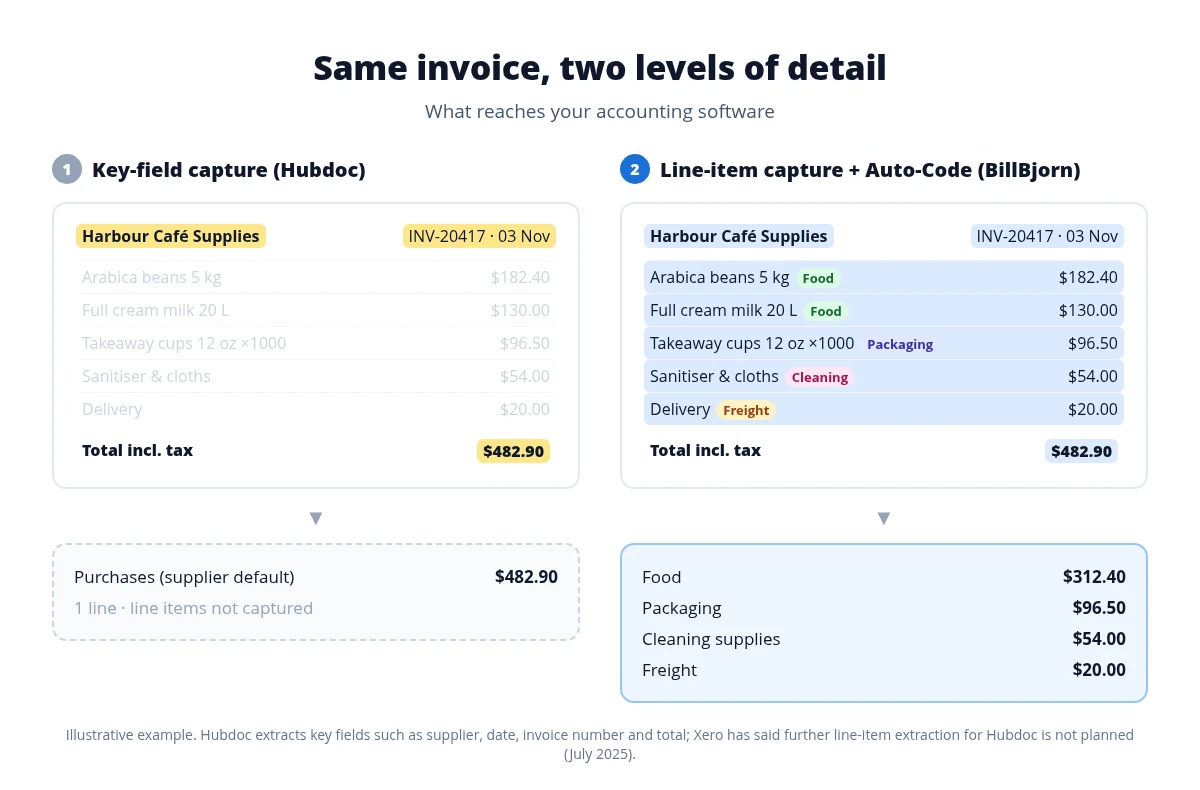 Key-field capture vs line-item capture with Auto-Code
From the Small plan, BillBjorn's Auto-Code reads every line item, groups the lines by meaning (Food, Packaging, Cleaning, Freight) and maps each group to the account, tax rate, and tracking category you chose. See how line splitting works.
Auto sync trusts the supplier, not the bill
Hubdoc's supplier rules can publish documents automatically with auto sync, even as approved bills. That's a supplier-level switch: once it's on, bills from that supplier go through.
The problem is that a regular supplier can still send an unusual bill: a much bigger amount than usual, or a coding that doesn't match.
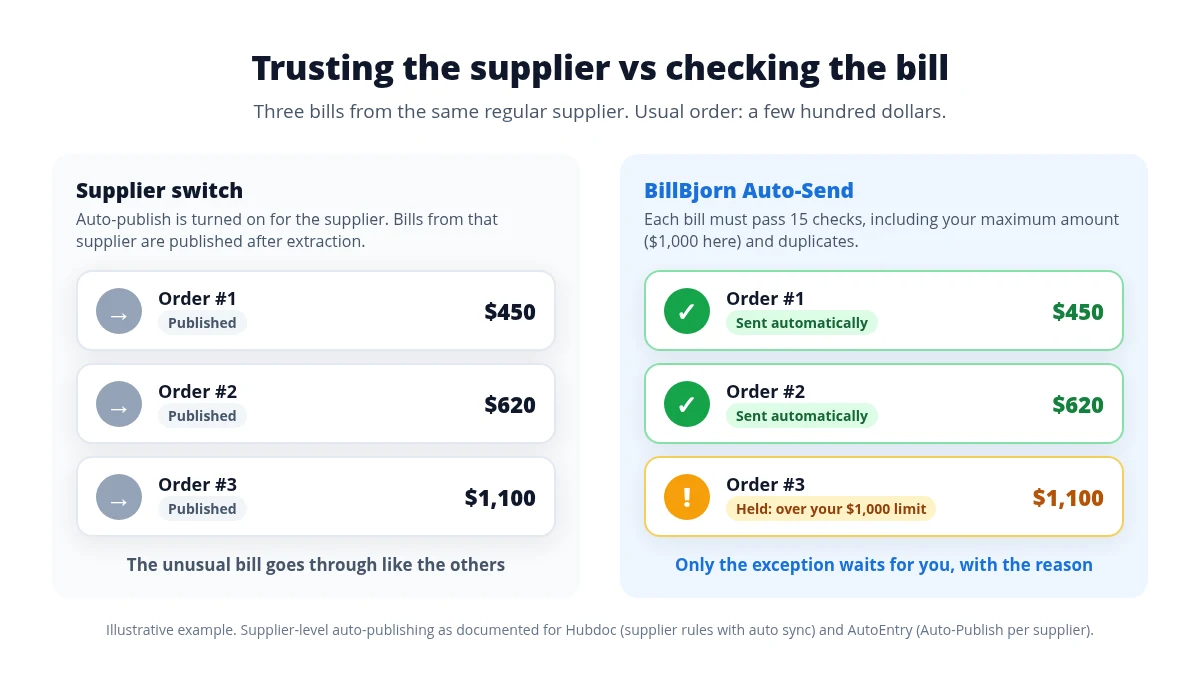 Supplier switch vs per-bill checks
BillBjorn Auto-Send checks each bill before it is sent: 15 checks covering a known supplier, totals that add up, valid accounts and tax codes, your maximum amount, and duplicates. If every check passes, the bill goes straight to Xero, approved if you choose. If one fails, the bill is held and you get an email with the reason.
Xero's attention has moved on
Xero hasn't retired Hubdoc, and there's no reason to panic if you use it today. But Xero's 2026 product updates have been about Smart Document Capture, and the line-item request on its product ideas forum is marked "Not in pipeline". If you need more than Hubdoc offers today, don't wait for Hubdoc to add it.
Should you just use Xero's Smart Document Capture?
Maybe. If you only use Xero and want capture built into the product you already pay for, try it first. According to Xero, it reads itemised receipts line by line, extracts tax rates, handles credit notes, and matches documents to existing transactions.
What it doesn't do yet (per Xero's own roadmap from September 2026):
- Supplier rules are "coming", so recurring suppliers aren't coded automatically yet.
- Approved bills aren't possible yet. Bills are created as drafts, and Xero lists creating bills as awaiting approval or awaiting payment under "further ahead". Every bill still needs someone to open and approve it.
- It's Xero only. If you or your clients also use QuickBooks Online, Sage, MYOB, or FreshBooks, you need a separate tool for those.
BillBjorn's approach is different: rules per supplier, Auto-Code for mixed invoices, and Auto-Send so routine bills arrive approved and don't need you at all. Bookkeepers who process hundreds of bills a month save time on the review step, not just on typing.
What it costs
Hubdoc is included with many Xero plans, so BillBjorn won't be cheaper than "included". The real question is how much review time you save.
| Plan | Documents/month | Price (billed yearly) | Auto-Code | Auto-Send |
|---|---|---|---|---|
| Solo | 50 | US$5/month | No | No |
| Small | 250 | US$10/month | Yes | No |
| Medium | 1,000 | US$20/month | Yes | Yes |
| Large | 2,500 | US$50/month | Yes | Yes |
Every plan covers one company with unlimited users. Accountants and bookkeepers with five or more clients can join the partner program for discounted client plans. See BillBjorn pricing for monthly billing and local currency.
If Auto-Send saves you two minutes on each of 300 routine bills a month, that's ten hours back, for US$20.
Only Review the Bills That Need You
Switch on Auto-Send for your five most predictable suppliers and see what's left in your inbox.
Start Your Free 30-Day TrialSwitching from Hubdoc to BillBjorn
You don't have to switch everything on day one. Bills you already published from Hubdoc stay in Xero with their attachments.
- Start the free trial and connect your Xero or QuickBooks Online company.
- Redirect your bill email. Every company gets its own BillBjorn email address. Point your supplier emails or Gmail/Outlook forwarding there (how email capture works).
- Create rules for your regular suppliers: account, tax code, and tracking category.
- Turn on Auto-Code for suppliers whose invoices mix expense types.
- Switch on Auto-Send for three to five predictable suppliers, with a maximum amount slightly above their usual bill. Turn on Mark Documents As Approved if you want those bills to arrive ready to pay.
- Check the first results in Xero, then add more suppliers.
Scanning paper? Scan2Invoice watched folders pick up files from your scanner, Dropbox, or OneDrive automatically.
The decision in one question
Do you want to approve every bill yourself?
- Yes, every bill opened and approved by hand → Xero's Smart Document Capture or Hubdoc
- No: routine bills approved in Xero automatically, each one checked first, with line items coded to the right accounts → BillBjorn
Also comparing other tools? See BillBjorn vs Dext and BillBjorn vs AutoEntry.
More comparisons

Frequently asked questions
Common questions about using BillBjorn as a Hubdoc alternative for Xero and QuickBooks Online. For setup help, visit our knowledge base.
Is BillBjorn a good Hubdoc alternative?
Yes, especially if you want routine bills to skip review. BillBjorn Auto-Send checks every bill and sends the ones that pass to Xero already approved (Awaiting Payment), so nobody has to open them. Hubdoc extracts the supplier, date, total, and invoice number and publishes a bill coded to the supplier's default account, unless you split it by hand. From the Small plan, BillBjorn's Auto-Code reads every line item and splits mixed invoices across accounts, and from the Medium plan Auto-Send can send routine bills automatically after 15 checks per bill. If you are happy to review every bill and one line per bill is enough, Hubdoc or Xero's built-in capture may be all you need.
Does Xero's Smart Document Capture create approved bills?
Not yet. Bills created by Smart Document Capture are drafts that you still have to approve in Xero. Xero lists creating bills as awaiting approval or awaiting payment as a future step on its roadmap (September 2026). BillBjorn Auto-Send can send routine bills to Xero as approved today, after checking each one.
Is Hubdoc free with Xero?
Xero's partner pages say Hubdoc is included in the Early, Growing, and Established plans. Hubdoc also lists a standalone subscription at US$12 per month. Since July 2026, Xero's own US pricing page lists Smart Document Capture, Xero's built-in document capture, as included in all three plans. Check Xero's pricing for your region.
Does Hubdoc extract line items?
Hubdoc extracts key fields such as the supplier, date, total, and invoice number. On Xero's product ideas forum, Xero said in July 2025 that it has no further developments planned for extracting more line-item detail in Hubdoc and suggested apps from the Xero App Store for that. BillBjorn's Auto-Code, included from the Small plan, reads and codes every line item.
Is Hubdoc being discontinued?
Xero has not announced a retirement date for Hubdoc as of November 2026. Xero's recent product updates have focused on Smart Document Capture, its built-in capture tool inside Xero Documents (formerly Files), launched in July 2026.
What is the difference between Hubdoc auto sync and BillBjorn Auto-Send?
Both can publish bills to Xero without anyone clicking Publish, and both can publish them as approved. The difference is what decides. Hubdoc auto sync is switched on per supplier, so every bill from that supplier goes through. BillBjorn Auto-Send checks each bill before it is sent: the supplier must be known, the totals must add up, accounts and tax codes must be valid, the amount must be under your limit, and the invoice must not be a duplicate. Bills that fail a check are held with the reason.
Does BillBjorn work with QuickBooks Online as well as Xero?
Yes. BillBjorn exports to QuickBooks Online, Xero, Sage Accounting, MYOB Business, and FreshBooks. Hubdoc works with Xero and QuickBooks Online.
How much does BillBjorn cost compared with Hubdoc?
BillBjorn plans start at US$5 per month billed yearly for 50 documents. Auto-Code is included from the Small plan (US$10 per month billed yearly, 250 documents), and Auto-Send from the Medium plan (US$20 per month billed yearly, 1,000 documents). Hubdoc is included with many Xero plans, so the reason to switch is time saved on coding and review, not a lower price.
Can I try BillBjorn alongside Hubdoc?
Yes. BillBjorn has a free 30-day trial with no credit card required. Connect your Xero or QuickBooks Online company, forward a month of bills to your BillBjorn email address, and compare the result with what Hubdoc produces.