BillBjorn vs AutoEntry:
No Credits to Count for Invoice Processing
Trusted Partner App for Leading Cloud-Based Accounting Software


TL;DR: AutoEntry is a broad data-entry tool owned by Sage, with 12 accounting integrations, desktop sync, and bank statement extraction. It's priced in credits, and invoices with line items cost double. BillBjorn focuses on supplier invoices and receipts for five cloud accounting platforms. It charges per document, with line items included from the Small plan, and its Auto-Send checks every bill before sending it, instead of trusting the supplier.
Which tool is right for you?
| Choose BillBjorn if you… | Choose AutoEntry if you… |
|---|---|
| Want line items coded automatically without paying per credit | Need bank or credit card statement extraction |
| Want a fixed monthly document allowance, not credits | Use desktop software such as Sage 50 or QuickBooks Desktop |
| Want routine bills sent automatically, with each one checked first | Use FreeAgent, KashFlow, ClearBooks, AccountsIQ, Reckon One, or Exact |
| Use QuickBooks Online, Xero, Sage Accounting, MYOB Business, or FreshBooks | Want one credit pool shared across many clients |
| Want mixed invoices split across accounts automatically | Process supplier statements as well as invoices |
BillBjorn vs AutoEntry: side-by-side comparison
| BillBjorn | AutoEntry | |
|---|---|---|
| Pricing model | Documents per month | Credits per month |
| Invoice with line items | 1 document (Small plan and above) | 2 credits |
| Entry plan (US) | Solo: 50 documents, US$5/month billed yearly | Bronze: 50 credits, $13/month |
| Largest listed plan (US) | Large: 2,500 documents, US$50/month billed yearly | Sapphire: 2,500 credits, $469/month |
| Unused allowance | Monthly allowance | Credits roll over for 90 days |
| Owner | TA Developer Pty Ltd (independent) | Sage |
| Accounting software | QuickBooks Online, Xero, Sage Accounting, MYOB Business, FreshBooks | 12 listed, incl. Sage, QuickBooks, Xero, FreeAgent, KashFlow, MYOB AccountRight, Reckon One, Exact |
| Desktop accounting software | No | Yes, via sync app |
| Bank & credit card statements | No | Yes (3 credits per page) |
| Split one invoice across accounts | Yes, Auto-Code | Line items extracted for 2 credits |
| Automatic posting | Auto-Send: 15 checks on every bill | Auto-Publish per supplier |
| Email-in & mobile app | Yes | Yes |
| Desktop watched folders | Yes (Scan2Invoice) | Not listed |
| Users | Unlimited users per company | Unlimited users and clients |
| Free trial | 30 days, no credit card | 25 free credits, no credit card |
Note: AutoEntry figures are taken from autoentry.com (pricing and integrations pages), checked November 2026, in USD excluding VAT. Prices differ by currency and region. Always confirm current pricing with AutoEntry.

Priced per Document, Not per Credit.
Connect your accounting software, forward a month of bills, and see what it would cost you. No credit card required.
Start Your Free 30-Day TrialWhat AutoEntry does well
AutoEntry is a mature product, built in Dublin and owned by Sage since 2019. It's good at a few things BillBjorn doesn't try to do:
- Breadth of integrations. AutoEntry lists 12 accounting platforms, including UK and Irish favourites such as FreeAgent, KashFlow, ClearBooks, AccountsIQ, and SortMyBooks.
- Desktop software. Sage 50 and QuickBooks Desktop connect through a sync app.
- Bank and supplier statements. AutoEntry extracts bank and credit card statements and supplier statements. BillBjorn doesn't.
- Practice-friendly credits. Unlimited users and unlimited clients on every plan, so one credit bundle can cover a whole practice.
- Flexible plans. Upgrade, downgrade, or pause at any time, and unused credits roll over for 90 days.
If statement extraction or desktop accounting software is central to your work, AutoEntry is the more complete tool.
Where credits start to hurt
Line items cost double
AutoEntry's pricing page lists 1 credit per invoice, but 2 credits per invoice with line items. If you want each line coded, for example a wholesale invoice with stock, packaging, and freight on one page, every invoice uses twice the credits.
BillBjorn counts each processed document once. From the Small plan, Auto-Code reads and codes the line items, and the invoice still counts as one document.
What a month actually costs
Here's the monthly cost at four volumes, for invoices with line items, at both companies' published US prices:
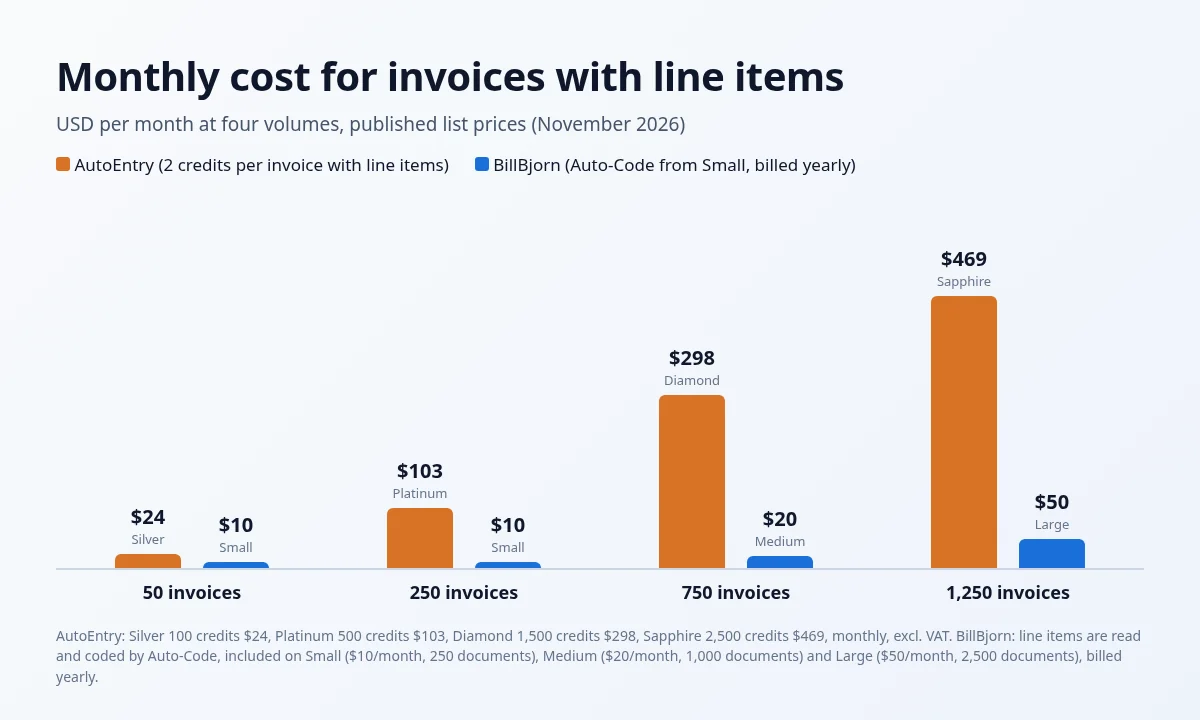 Monthly cost for invoices with line items
| Invoices per month | AutoEntry, with line items | BillBjorn, with line items (billed yearly) | AutoEntry, header only | BillBjorn, cheapest plan (billed yearly) |
|---|---|---|---|---|
| 50 | 100 credits: Silver, $24 | Small, $10 | 50 credits: Bronze, $13 | Solo, $5 |
| 250 | 500 credits: Platinum, $103 | Small, $10 | 250 credits: Gold, $46 + 50 overage credits* | Small, $10 |
| 750 | 1,500 credits: Diamond, $298 | Medium, $20 | 750 credits: Platinum, $103 + 250 overage credits* | Medium, $20 |
| 1,250 | 2,500 credits: Sapphire, $469 | Large, $50 | 1,250 credits: Diamond, $298 | Large, $50 |
* AutoEntry lets you use up to 200% of your plan's credits and bills the extra on your next invoice at a higher per-credit rate than the plan. The overage rate isn't published on the pricing page, so check it before choosing a smaller plan.
AutoEntry prices are monthly, excluding VAT. BillBjorn prices are per month billed yearly; monthly billing costs more. Line items on BillBjorn come with Auto-Code, from the Small plan.
A practice with busy clients
Credits have one real advantage: a practice can share one bundle across all its clients. BillBjorn plans are per company, but each plan covers a lot of documents: 250 a month on Small with Auto-Code, and up to 1,000 on Medium with Auto-Send as well.
Take a bookkeeper with 10 clients, each sending about 100 invoices a month (1,000 invoices in total):
- AutoEntry, header only: 1,000 credits, so Diamond ($298), or Platinum ($103) plus 500 overage credits at a higher per-credit rate.
- AutoEntry, with line items: 2,000 credits, so Sapphire ($469/month).
- BillBjorn, with line items: 10 × Small at $10 = $100/month billed yearly, with Auto-Code for every client.
- BillBjorn, with line items and Auto-Send: 10 × Medium at $20 = $200/month billed yearly.
With line items, that's about a fifth of AutoEntry's price, before the partner program discount of 10–50% for bookkeepers with five or more clients. Even with Auto-Send for every client, it's less than half. And each client could grow to 250 invoices a month on Small, or 1,000 on Medium, without the price changing.
A shared credit bundle only works out cheaper when you have many clients that each send just a handful of documents and need line items.
Run your own numbers: the result depends on how many clients you have, how many documents each one sends, and whether you need line items. With BillBjorn there's no shared credit balance to watch.
Auto-Publish vs Auto-Send
Both tools can post bills without you clicking Publish. They decide differently.
AutoEntry Auto-Publish is switched on per supplier. You save a default nominal and VAT code for the supplier, turn the toggle on, and AutoEntry sends that supplier's invoices to your accounting software as soon as they finish processing.
BillBjorn Auto-Send checks each bill before sending it: 15 checks covering a known supplier, totals that add up, valid accounts and tax codes, your maximum amount, and duplicates. If one check fails, the bill is held and you get an email with the reason.
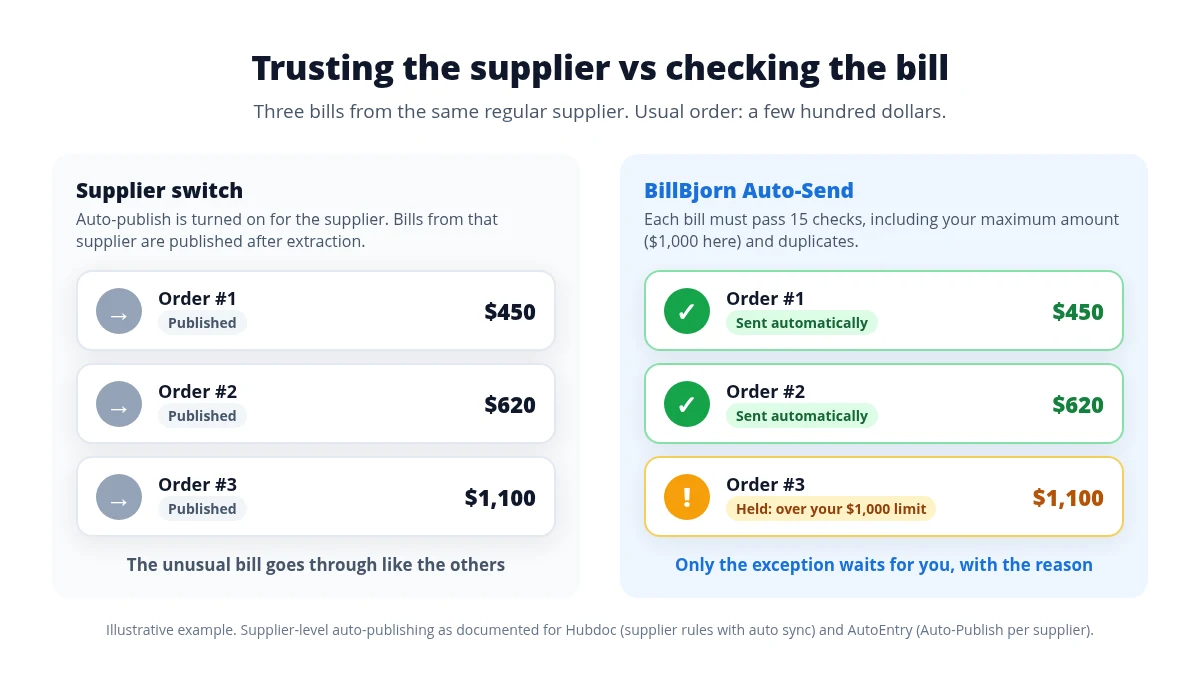 Supplier switch vs per-bill checks
A regular supplier can still send an unusual bill: a bigger order, a re-sent invoice, a different coding. With a supplier switch, it goes straight through. With Auto-Send, you see it before it reaches your books. Read how Auto-Send works.
Automate the Routine. Review the Exceptions.
Switch on Auto-Send for your most predictable suppliers. Every bill is checked, and anything unusual waits for you.
Start Your Free 30-Day TrialWho should use AutoEntry
AutoEntry is the right choice when you need:
- Bank, credit card, or supplier statement extraction
- Desktop accounting software such as Sage 50 or QuickBooks Desktop
- An integration BillBjorn doesn't have, such as FreeAgent, KashFlow, ClearBooks, AccountsIQ, Reckon One, or Exact
- A single credit pool across a large number of very low-volume clients
Who should use BillBjorn
BillBjorn is the right choice when you:
- Process supplier invoices and receipts into QuickBooks Online, Xero, Sage Accounting, MYOB Business, or FreshBooks
- Want line items read and coded automatically with Auto-Code (Small plan and above), without paying per credit
- Have invoices that mix several expense types and want them split automatically with Auto-Code
- Want routine bills sent automatically, with each one checked first
- Scan paper in bulk and want watched folders that pick up files from your scanner, Dropbox, or OneDrive
Switching from AutoEntry to BillBjorn
- Start the free trial and connect your accounting software.
- Forward bills to your BillBjorn email address. Every company gets its own address (email capture guide).
- Recreate your supplier defaults as rules: account, tax code, and tracking.
- Turn on Auto-Send for three to five predictable suppliers, with a maximum amount slightly above their usual bill.
- Run both tools side by side for a month, then compare accuracy, review time, and cost before you cancel AutoEntry. AutoEntry keeps your data available for 13 months after you cancel.
The decision in one question
Do you need statements and desktop software, or fast, checked supplier bills?
- Bank statements, supplier statements, Sage 50, QuickBooks Desktop, or a niche integration → AutoEntry
- Supplier invoices and receipts into a cloud platform, with line items coded by Auto-Code and routine bills sent automatically → BillBjorn
Also comparing other tools? See BillBjorn vs Dext and BillBjorn vs Hubdoc.
More comparisons
- Best Dext alternatives
- Best bill capture apps for Xero
- Best invoice scanning apps for QuickBooks Online

Frequently asked questions
Common questions about using BillBjorn as an AutoEntry alternative. For setup help, visit our knowledge base.
Is BillBjorn a good AutoEntry alternative?
Yes, if you mainly process supplier invoices and receipts into QuickBooks Online, Xero, Sage Accounting, MYOB Business, or FreshBooks. BillBjorn counts documents rather than credits, reads and codes line items with Auto-Code from the Small plan, and can send routine bills automatically after checking each one. If you need bank statement extraction or desktop software such as Sage 50 or QuickBooks Desktop, AutoEntry is the better fit.
How does AutoEntry pricing work?
AutoEntry sells monthly credit bundles. Its pricing page lists 1 credit per purchase or sales invoice, 2 credits per invoice with line items, 1 credit per expense, 2 credits per supplier statement, and 3 credits per page of a bank or credit card statement. Unused credits roll over for 90 days. US plans range from Bronze (50 credits, $13/month) to Sapphire (2,500 credits, $469/month), excluding VAT.
How much cheaper is BillBjorn than AutoEntry?
At AutoEntry's published US prices, 250 invoices a month with line items needs 500 credits (Platinum, $103/month). BillBjorn's Small plan covers 250 documents, with line items read and coded by Auto-Code, for $10/month billed yearly. The gap depends on your volume, document mix, billing cycle, and region, so compare with your own numbers.
Does BillBjorn charge extra for line items?
Not per document. Line items are read and coded by Auto-Code, which is included on the Small, Medium and Large plans, and an invoice with line items still counts as one document. The Solo plan doesn't include Auto-Code.
What is the difference between AutoEntry Auto-Publish and BillBjorn Auto-Send?
AutoEntry's Auto-Publish is switched on per supplier once a default nominal and VAT code are saved, and then sends that supplier's invoices to your accounting software once they finish processing. BillBjorn Auto-Send runs 15 checks on each bill, including your maximum amount and duplicates, and holds any bill that fails with the reason.
Which accounting software does AutoEntry support that BillBjorn doesn't?
AutoEntry lists integrations with Sage, QuickBooks, Xero, FreeAgent, KashFlow, SortMyBooks, ClearBooks, AccountsIQ, MYOB AccountRight, Reckon One, FuseMetrix, and Exact, including desktop products through its sync app. BillBjorn connects to the cloud versions of QuickBooks Online, Xero, Sage Accounting, MYOB Business, and FreshBooks.
Can I try BillBjorn before cancelling AutoEntry?
Yes. BillBjorn has a free 30-day trial with no credit card required. Run both side by side for a month, forward the same bills to each, and compare accuracy, review time, and cost.