Best
Invoice Scanning Apps for QuickBooks Online
Trusted Partner App for Leading Cloud-Based Accounting Software


TL;DR: QuickBooks Online can read receipts and bills you forward to it, but you review each one, and line-item bill entry needs QuickBooks Online Advanced or Bill Pay Elite. BillBjorn starts at US$6.50 a month; its Medium and Large plans add line items with Auto-Code and send routine bills without review, checked first. Dext and AutoEntry suit practices that also need statements. Hubdoc is cheap for key fields. BILL is the choice if paying bills and approvals matter more than capture.
Last updated: November 14, 2026. Prices are list prices in USD, excluding tax, from each vendor's website on November 13, 2026.
A note on bias: BillBjorn wrote this article, and BillBjorn is on the list. We used each vendor's own pricing and help pages, and we say where another tool fits better.
QuickBooks Online invoice scanning apps at a glance
| App | Best for | Starting price | Line items | Bills without review |
|---|---|---|---|---|
| BillBjorn | Small businesses and bookkeepers | US$6.50/mo (US$5 billed yearly) | Medium and Large (Auto-Code) | Auto-Send: each bill checked first (Medium and Large) |
| QuickBooks receipt capture | A few receipts a month | Included with QBO | No (date, amount, vendor, card) | No: review in Receipts tab |
| QuickBooks AI Bill Entry | QBO Advanced users | Included in Advanced and Bill Pay Elite | Yes | No: draft bill for review |
| Dext | Practices needing a full platform | US$31.50/mo, 250 docs, 5 users | Add-on from US$20.50/mo | Auto-publish per supplier |
| AutoEntry | Statements, credit pools | US$13/mo, 50 credits | 2 credits per invoice | Auto-Publish per supplier |
| Hubdoc | Key fields at low cost | US$12/mo | No | Auto sync per supplier |
| Datamolino | UK businesses wanting approvals | £17/mo, 100 docs | Optional setting | Not stated |
| BILL | Paying bills and approvals | US$49 per user/mo | AI multi-line coding (Team and up) | Approval workflows |
 QuickBooks Online on its own vs with a capture app
How we picked and ranked them
Every option here gets supplier bills into QuickBooks Online. We compared them on:
- Cost at 50 to 1,000 bills a month
- Line items: included, extra, or not available
- Review effort: does every bill still need opening, and what stops a wrong one going through automatically?
- QuickBooks plan needed: some features only come with the top QuickBooks tier
- Setup effort for a small team
1. BillBjorn: best for small businesses and bookkeepers
BillBjorn reads supplier bills and receipts with AI and creates them in QuickBooks Online. It also works with Xero, Sage Accounting, MYOB Business and FreshBooks.
What stands out
- Line items with Auto-Code on Medium and Large. A bill counts once, however many lines it has.
- No QuickBooks Online Advanced needed for line items.
- Supplier rules fill in the account, tax code and class for regular vendors.
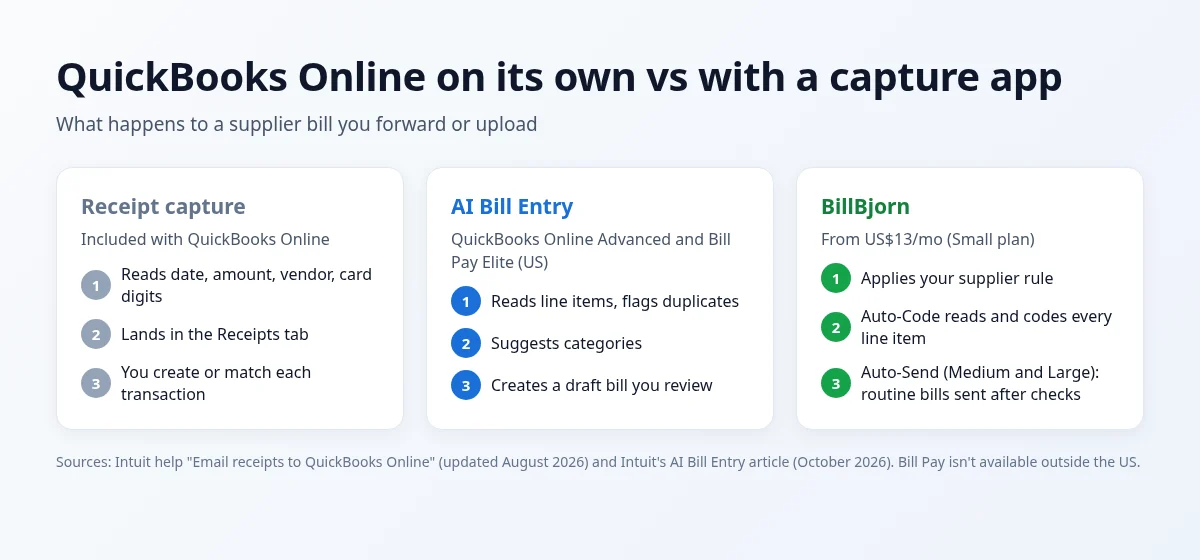
- Auto-Send (Medium and Large) sends routine bills to QuickBooks without anyone opening them, after checking each one: the vendor exists in QuickBooks, the totals add up, the accounts and tax codes are valid, the amount is under your limit, and it isn't a duplicate. Anything that fails is held with the reason.
- Auto-Code (Medium and Large) splits mixed invoices across accounts.
- Multicurrency bills, an email address for each company, a mobile app, and desktop watched folders with Scan2Invoice.
- Rated 4.8 out of 5 from 59 ratings on the QuickBooks App Store.
Pricing: Solo US$6.50/month for 50 documents (US$5 billed yearly), Small US$13 for 250 (US$10), Medium US$26 for 1,000 (US$20), Large US$65 for 2,500 (US$50). One company and unlimited users on every plan. 30-day free trial, no credit card. See BillBjorn pricing.
Where it falls short: no bank statement extraction, no bill payments, no multi-step approval workflows, and no QuickBooks Desktop. Auto-Send and Auto-Code need Medium or Large.
2. QuickBooks Online receipt capture: best for a few receipts a month
On QuickBooks Online, you can forward receipts and bills to your QuickBooks email address or upload them. QuickBooks pulls out the date, amount, vendor and last four digits of the card, and puts each item in the Receipts tab. You then create the transaction or match it to one that already exists.
Where it falls short: it reads header details, not line items, and every item is reviewed and created by hand.
Choose it if you handle a few receipts a month and want nothing extra. See QuickBooks receipt scanner: built-in vs AI OCR tools.
3. QuickBooks AI Bill Entry: best if you're already on QuickBooks Online Advanced
Intuit's AI Bill Entry captures line-item detail, catches duplicates and suggests categories. You forward bills to a dedicated Intuit email address or upload them in bulk, and it creates a draft bill for review. Intuit says it's included in QuickBooks Online Advanced and Bill Pay Elite. Bill Pay isn't available outside the US.
Where it falls short: each bill is still a draft that someone reviews and approves, and you need the top QuickBooks tier or Bill Pay Elite.
Choose it if you're already paying for Advanced or Bill Pay Elite and are happy to review each bill.
4. Dext: best for practices that need a full platform
Dext (formerly Receipt Bank) covers receipts, invoices, expense claims, supplier and bank statements, document storage and practice tools, and can auto-publish bills from suppliers you switch on.
Pricing: US business plan US$31.50 a month (US$25.21 billed yearly) for 250 documents and 5 users. Line items are an add-on from US$20.50 a month or US$0.50 per document. 14-day free trial.
Choose it if you'll use the wider platform. See BillBjorn vs Dext and the best Dext alternatives.
5. AutoEntry: best for statements and credit pools
AutoEntry, owned by Sage, charges credits: 1 per invoice, 2 with line items, 3 per bank statement page. Plans run from US$13 for 50 credits to US$469 for 2,500, and unused credits roll over for 90 days. It also supports QuickBooks Desktop through a sync app.
Where it falls short: line items double the cost of every invoice.
Choose it if you need statements extracted or still use desktop software. See BillBjorn vs AutoEntry.
6. Hubdoc: best for key fields at the lowest cost
Hubdoc syncs to QuickBooks Online as well as Xero, costs US$12 a month standalone, and comes with a 30-day free trial. It captures key fields (supplier, date, total, invoice number), not line items, and handles bank statements.
Choose it if most bills go to a single account and you want a low, flat price.
7. BILL: best if paying bills and approvals come first
BILL is an accounts payable platform. Its Essentials plan is US$49 per user a month, with QuickBooks Online via manual CSV import and export. Team (US$65 per user) and Corporate (US$89 per user) add automatic two-way QuickBooks Online sync and AI multi-line bill coding.
Where it falls short: per-user pricing adds up, and you're paying for a payments platform if capture is all you need.
Choose it if approvals and paying vendors are the main problem, not data entry.
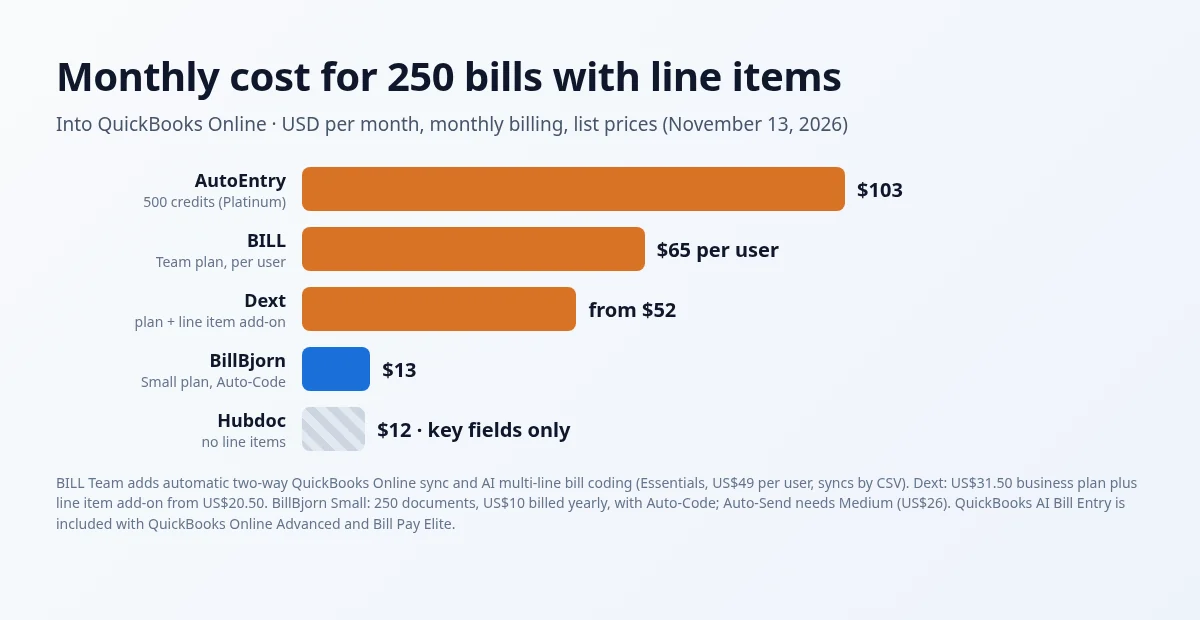
What it costs at 250 bills a month
 Monthly cost for 250 bills with line items
At 250 bills a month with line items, on monthly billing:
| App | Monthly cost | Notes |
|---|---|---|
| BillBjorn | US$26 (Medium) | US$20 billed yearly; 1,000 documents, with Auto-Code and Auto-Send |
| Dext | From US$52 | US$31.50 plan + line item add-on from US$20.50 |
| BILL | US$65 per user | Team plan, for QuickBooks sync and AI bill coding |
| AutoEntry | US$103 | 500 credits (Platinum) at 2 credits per invoice |
| Hubdoc | US$12 | Key fields only, no line items |
| QuickBooks AI Bill Entry | Included | Needs QuickBooks Online Advanced or Bill Pay Elite |

Line Items into QuickBooks, Without Advanced
Connect QuickBooks Online, forward a few bills, and try Auto-Code and Auto-Send during your trial. No credit card required.
Start Your Free 30-Day Trial
Frequently asked questions
Common questions about invoice scanning for QuickBooks Online. For setup help, visit our knowledge base.
What is the best invoice scanning app for QuickBooks Online?
For small businesses and bookkeepers, BillBjorn is a strong choice: plans from US$6.50 a month, line items with Auto-Code on Medium and Large, rated 4.8 out of 5 from 59 ratings on the QuickBooks App Store. QuickBooks' own receipt capture is enough for a few receipts. Dext or AutoEntry suit practices that also need bank statements. BILL suits businesses that mainly want to pay bills and run approvals.
Can QuickBooks Online scan invoices by itself?
Yes, partly. On QuickBooks Online you can forward or upload receipts and bills, and QuickBooks extracts the date, amount, vendor and card digits for you to review in the Receipts tab. AI Bill Entry, included in QuickBooks Online Advanced and Bill Pay Elite in the US, also captures line items and creates draft bills for review.
Does QuickBooks AI Bill Entry post bills automatically?
No. According to Intuit, extracted details are used to generate a draft bill for review, and a person still reviews and approves it before anything gets paid.
Which QuickBooks apps extract line items?
BillBjorn reads and codes line items with Auto-Code on its Medium and Large plans, without needing QuickBooks Online Advanced. AutoEntry charges 2 credits instead of 1 for an invoice with line items. Dext's US business plan offers line items as an add-on from US$20.50 a month. Hubdoc captures key fields only. QuickBooks AI Bill Entry captures line items on QuickBooks Online Advanced and Bill Pay Elite.
How much does BillBjorn cost for QuickBooks Online?
Solo is US$6.50 a month for 50 documents (US$5 billed yearly), Small US$13 for 250 (US$10), Medium US$26 for 1,000 (US$20) and Large US$65 for 2,500 (US$50). Auto-Send and Auto-Code are on Medium and Large. There's a 30-day free trial with no credit card.
Is this comparison neutral?
BillBjorn wrote it, so we're not neutral. We used each vendor's own pricing and help pages, checked on November 13, 2026, and we say where another tool fits better.