Best
AI Invoice OCR Tools for Small Businesses
Trusted Partner App for Leading Cloud-Based Accounting Software


TL;DR: If the invoices should end up as bills in your accounting software, choose an accounting-connected tool: BillBjorn (from US$6.50 a month, line items on Medium and Large), AutoEntry or Dext. If the data needs to go into a spreadsheet, a database or another app, choose a general extraction tool: Docparser or Parseur. If you're building your own software, look at Veryfi, Nanonets, Google Document AI or Azure Document Intelligence.
Last updated: November 14, 2026. Prices are list prices in USD unless stated, excluding tax, from each vendor's website on November 13, 2026.
A note on bias: BillBjorn wrote this article, and BillBjorn is on the list. We used each vendor's own pricing pages, and we say where another tool fits better.
Two kinds of AI invoice OCR
 Two kinds of AI invoice OCR
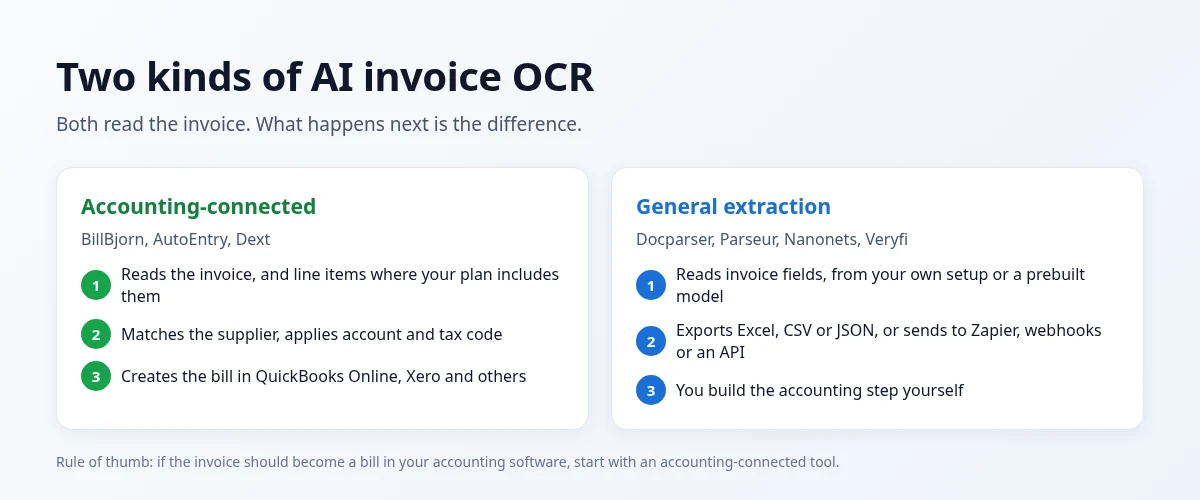
OCR reads the text on an invoice. Modern AI extraction goes further and understands which number is the total, which date is the due date, and which rows are line items, without a template for each supplier.
What happens next is the real difference:
- Accounting-connected tools match the supplier, apply your account and tax code, and create the bill in QuickBooks Online, Xero or similar. You end up with books, not a spreadsheet.
- General extraction tools hand you the fields as Excel, CSV or JSON, or push them through Zapier, Make, webhooks or an API. You (or your developer) decide what happens next.
AI invoice OCR tools at a glance
| Tool | Type | Best for | Entry paid plan | Free option |
|---|---|---|---|---|
| BillBjorn | Accounting-connected | Small businesses on QBO, Xero, Sage, MYOB, FreshBooks | US$6.50/mo, 50 docs | Free invoice converter, 30-day trial |
| AutoEntry | Accounting-connected | Statements, desktop software | US$13/mo, 50 credits | 25 free credits |
| Dext | Accounting-connected | Practices needing a full platform | US$31.50/mo, 250 docs | 14-day trial |
| Docparser | General extraction | Rule-based parsing into spreadsheets and apps | US$39/mo, 100 docs | 14-day trial |
| Parseur | General extraction | Email and PDF parsing into automations | Plans from 100 pages/mo | 20 pages/mo free |
| Nanonets | General extraction / AI workflows | Custom document workflows | US$100/mo, 100 credits | US$50 in free credits |
| Veryfi | Developer API | Apps that need receipt and invoice data | US$500/mo minimum | 100 docs/mo free |
| Google Document AI / Azure Document Intelligence | Developer API | Engineering teams on those clouds | Pay per page | Azure: 500 pages/mo free |
How we picked and ranked them
We ranked for small businesses, not enterprise AP teams, on:
- Time to first result: can a non-technical person get useful data on day one?
- Where the data goes: straight into accounting software, or into a file you still have to import?
- Line items: included, extra, or setup-dependent
- Entry price and cost at 50 to 1,000 invoices a month
- Free option for trying it on your own invoices
Enterprise accounts payable platforms without published small-business pricing aren't included.
Accounting-connected tools
1. BillBjorn: best for small businesses on cloud accounting
BillBjorn reads invoices and receipts with AI and creates the bills in QuickBooks Online, Xero, Sage Accounting, MYOB Business or FreshBooks.
- Line items with Auto-Code on Medium and Large, counted as one document.
- Supplier rules for accounts, tax codes and tracking.
- Auto-Code codes line items to the right accounts, and Auto-Send sends routine bills without review after checking each one (both on Medium and Large).
- Email-in, mobile app, uploads and desktop watched folders with Scan2Invoice.
- Rated 4.8 out of 5 from 59 ratings on the QuickBooks App Store; Xero Global App Awards finalist in 2025 and 2026.
Pricing: US$6.50/month for 50 documents (US$5 billed yearly) up to US$65 for 2,500 (US$50 billed yearly). 30-day free trial, no credit card. See BillBjorn pricing.
Free tool: the free invoice converter turns a PDF or scanned invoice into Excel, CSV or an import file for QuickBooks Online or Xero, with no account, up to 5 invoices in 24 hours.
Where it falls short: no bank statements, no expense claims, no approval workflows, and no general-purpose API for feeding other systems.
2. AutoEntry: best for statements and desktop software
AutoEntry, owned by Sage, extracts invoices, receipts, and bank and credit card statements, and publishes to 12 accounting packages, including desktop software. It charges credits: 1 per invoice, 2 with line items, 3 per statement page, from US$13 for 50 credits. See BillBjorn vs AutoEntry.
3. Dext: best for practices needing a full platform
Dext adds expense claims, supplier and bank statements, document storage and practice tools to invoice capture. The US business plan is US$31.50 a month (US$25.21 billed yearly) for 250 documents and 5 users, with line items as an add-on from US$20.50 a month. See the best Dext alternatives.
General extraction tools
4. Docparser: best for rule-based parsing into spreadsheets and apps
Docparser lets you set up parsers for your document types and export to Excel, CSV, JSON or XML, Google Sheets, or hundreds of other apps.
Pricing: Starter US$39 a month (US$32.50 billed yearly) for 100 documents of up to 5 pages, Professional US$74 (US$61.50), Business US$159 (US$133). 14-day free trial, no credit card.
Where it falls short: no direct QuickBooks or Xero bill creation listed on its pricing page; you set up the parsing and the next step yourself.
5. Parseur: best for parsing emails and PDFs into automations
Parseur's AI extracts the fields you describe from emails, PDFs and attachments, and sends them to Excel, CSV, JSON, Google Sheets, Zapier, Make, Power Automate, webhooks or an API.
Pricing: a free plan with 20 pages a month; paid plans start at 100 pages a month. Its pricing page showed us local currency, so check it for your region.
Where it falls short: QuickBooks and Xero aren't listed as integrations on its pricing page, so bills would go through an automation you build.
6. Nanonets: best for custom AI document workflows
Nanonets builds document workflows out of AI "blocks", billed per block run (US$0.02 to US$0.30). Its own example puts a typical invoice workflow at under US$2 per invoice end-to-end.
Pricing: starts free with US$50 in credits, then US$100 a month for 100 credits. Growth and Enterprise plans go through sales.
Where it falls short: priced and built for custom workflows, so it costs more per invoice than accounting-connected tools for a small business.
Developer APIs
7. Veryfi: best for apps that need receipt and invoice data
Veryfi's OCR API returns structured data from receipts (US$0.08 each) and invoices (US$0.16 each), with line-item detail through its Product Intelligence add-on. There's a free tier of up to 100 documents a month; the Starter plan has a US$500 monthly minimum.
8. Google Document AI and Azure Document Intelligence: best for engineering teams on those clouds
Both offer prebuilt invoice and receipt models, priced per page. Azure's free tier covers 500 pages a month. You'll need a developer to connect the output to your accounting software.
Entry prices compared
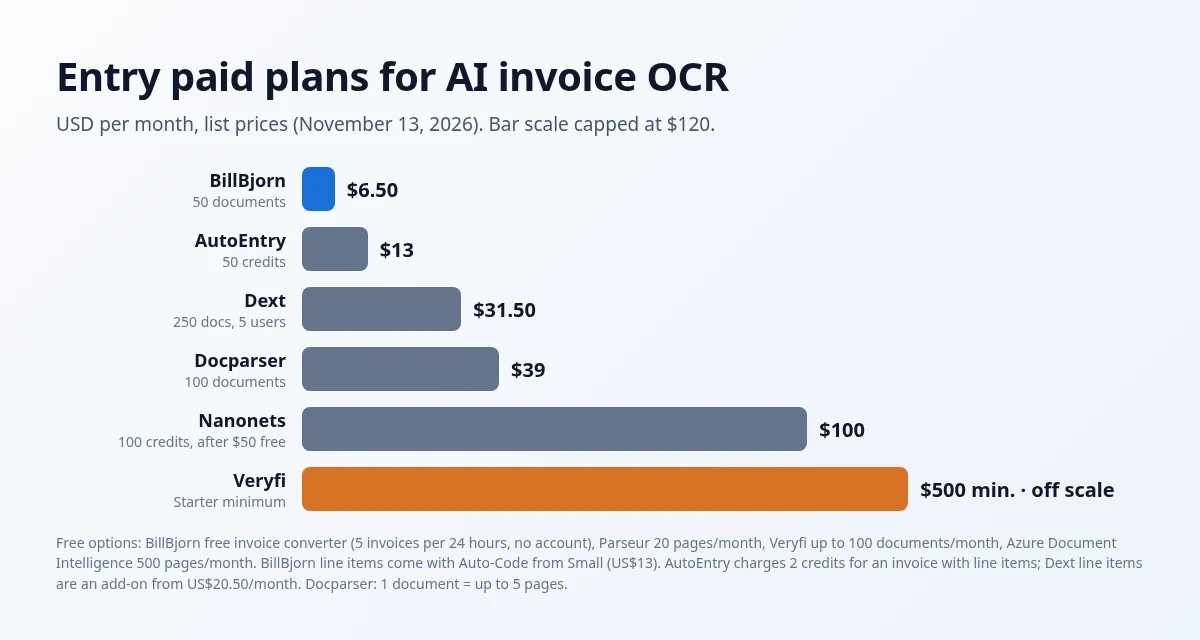 Entry paid plans compared
Which AI invoice OCR tool should you choose?
| If you want… | Consider |
|---|---|
| Bills created in QBO, Xero, Sage, MYOB or FreshBooks | BillBjorn |
| Bank and credit card statements too, or desktop accounting software | AutoEntry or Dext |
| Invoice data in Excel or Google Sheets | Docparser, Parseur, or BillBjorn's free converter for a few invoices |
| Fields pushed into Zapier, Make or your own app | Parseur or Docparser |
| An OCR API inside your own product | Veryfi, Google Document AI or Azure Document Intelligence |
| Custom multi-step document workflows | Nanonets |
For a deeper look at the process, see how to automate invoice data entry with AI and invoice data extraction.

From Invoice to Bill, Not Just to a Spreadsheet
Forward a few invoices and see them arrive in your accounting software. No credit card required.
Start Your Free 30-Day Trial
Frequently asked questions
Common questions about AI invoice OCR tools. For setup help, visit our knowledge base.
What is the best AI invoice OCR tool for a small business?
If the invoices should end up in QuickBooks Online, Xero, Sage Accounting, MYOB Business or FreshBooks, an accounting-connected tool such as BillBjorn is usually the best fit, because it creates the bills for you instead of handing you a spreadsheet. If you need data in Excel, a database or another system, a general extraction tool like Docparser or Parseur fits better. Developers who want an API can look at Veryfi, Nanonets, Google Document AI or Azure Document Intelligence.
Is there a free AI invoice OCR tool?
Yes. BillBjorn's free invoice converter turns a PDF or scanned invoice into Excel, CSV or an accounting import file with no account, up to 5 invoices in 24 hours. Parseur has a free plan with 20 pages a month, Veryfi has a free tier of up to 100 documents a month, and Azure Document Intelligence has a free tier of 500 pages a month.
What is the difference between invoice OCR and an invoice capture app?
Invoice OCR reads the text and fields on an invoice. An invoice capture app adds the accounting steps around it: matching the supplier, applying the account and tax code, splitting line items, and creating the bill in your accounting software.
Do AI invoice OCR tools extract line items?
Most can. BillBjorn reads and codes line items with Auto-Code on its Medium and Large plans. AutoEntry charges 2 credits instead of 1. Dext offers line items as an add-on on its US business plan. Veryfi provides line-item detail through its Product Intelligence add-on. General parsers like Docparser and Parseur can extract tables if you set them up to.
How much does AI invoice OCR cost?
Among the tools we compared, paid plans start at US$6.50 a month for 50 documents (BillBjorn), US$13 for 50 credits (AutoEntry), US$31.50 for 250 documents (Dext), US$39 for 100 documents (Docparser), US$100 a month after free credits (Nanonets) and a US$500 monthly minimum (Veryfi Starter). Prices checked November 13, 2026.
Is this comparison neutral?
BillBjorn wrote it, so we're not neutral. We used each vendor's own pricing pages, checked on November 13, 2026, and we say where another tool fits better.