Automate Invoice
Data Entry with AI
Trusted Partner App for Leading Cloud-Based Accounting Software




Stop Typing Invoices Line by Line
BillBjorn extracts supplier details, dates, tax, totals and line items with AI, then sends the data directly to your accounting software.
Start Your Free 30-Day Trial NowWhy Manual Invoice Data Entry Is Still Costing Bookkeepers Time
If you're a bookkeeper or you run the books for a small business, you already know the drill: an invoice lands in your inbox, a supplier drops a PDF in a shared folder, or a receipt shows up as a photo from a staff member's phone. Someone still has to open it, read it, and type the supplier name, invoice number, date, tax amount, and total into the accounting system, line by line, invoice by invoice.
It's slow. It's repetitive. And it's exactly the kind of task that's prone to typos, transposed digits, and missed tax codes, the sort of small errors that turn into reconciliation headaches at month-end.
AI invoice data entry solves this by reading the invoice for you: extracting the structured fields automatically and pushing them into QuickBooks Online, Xero, Sage, MYOB, or FreshBooks, ready for review instead of retyping.
This guide walks through how the process actually works end to end, from the moment an invoice arrives to the moment it lands in your accounting software, and where a focused tool like BillBjorn fits for bookkeepers and SMBs who need reliable extraction and clean accounting integration, without the overhead of a full accounts payable platform.
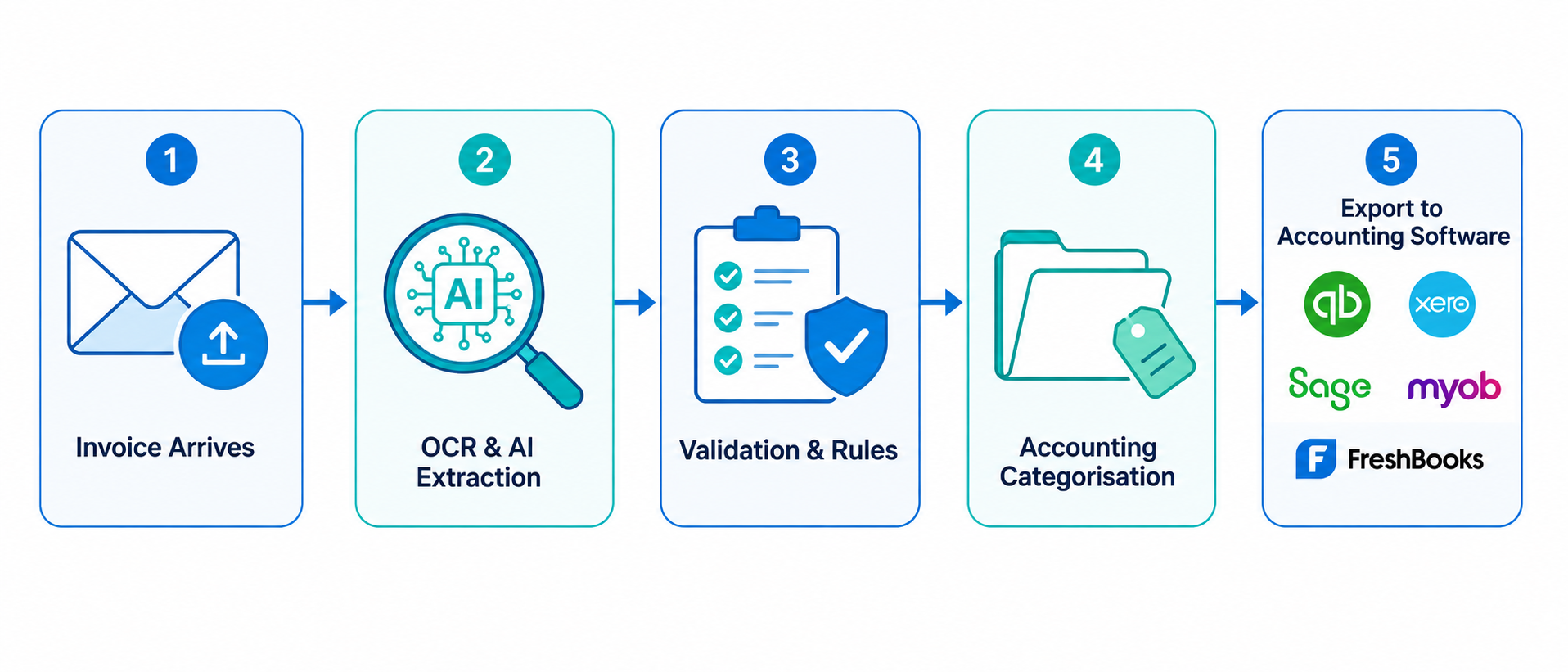 How AI invoice data entry works, from upload to accounting export
The End-to-End Workflow: From Invoice to Accounting Entry
Automating invoice data entry isn't a single step, it's a pipeline. Understanding each stage makes it easier to evaluate any tool, including BillBjorn, and to know what "AI-powered" should actually mean in practice.
1. Getting the Invoice Into the System
Automation only helps if invoices actually make it into the pipeline without someone manually gathering them first. The intake step should fit however invoices actually arrive:
- Forward by email — send or CC an invoice to a dedicated inbound address and it's picked up automatically, no manual download-and-upload step.
- Upload or drag-and-drop — PDFs and scanned files uploaded directly through the web app.
- Mobile capture — snap a photo of a paper receipt or invoice with a phone, useful for expenses collected on the go.
- Watched folders — a desktop companion app like Scan2Invoice monitors a scanner output folder, Dropbox, or OneDrive folder and automatically imports new files without anyone touching a keyboard.
The goal is zero friction between "I received an invoice" and "it's in the processing queue."
2. OCR and AI Data Extraction
This is where the actual reading happens. Optical character recognition (OCR) converts the scanned image or PDF into machine-readable text, and AI/machine learning models interpret that text in context to identify which numbers and strings correspond to which fields.
A capable extraction engine should reliably pull out:
- Supplier name and contact details
- Invoice number and reference
- Invoice date and due date
- Currency and, where relevant, exchange rate
- Tax amounts and tax rates
- Subtotal and grand total
- Individual line items, not just the total
That last point matters more than it sounds. A lot of "invoice scanning" tools stop at supplier, date, and total, which is enough to record a bill but not enough to code it properly against a chart of accounts. Real bookkeeping work usually needs the line-item detail, especially for invoices that mix multiple types of purchases.
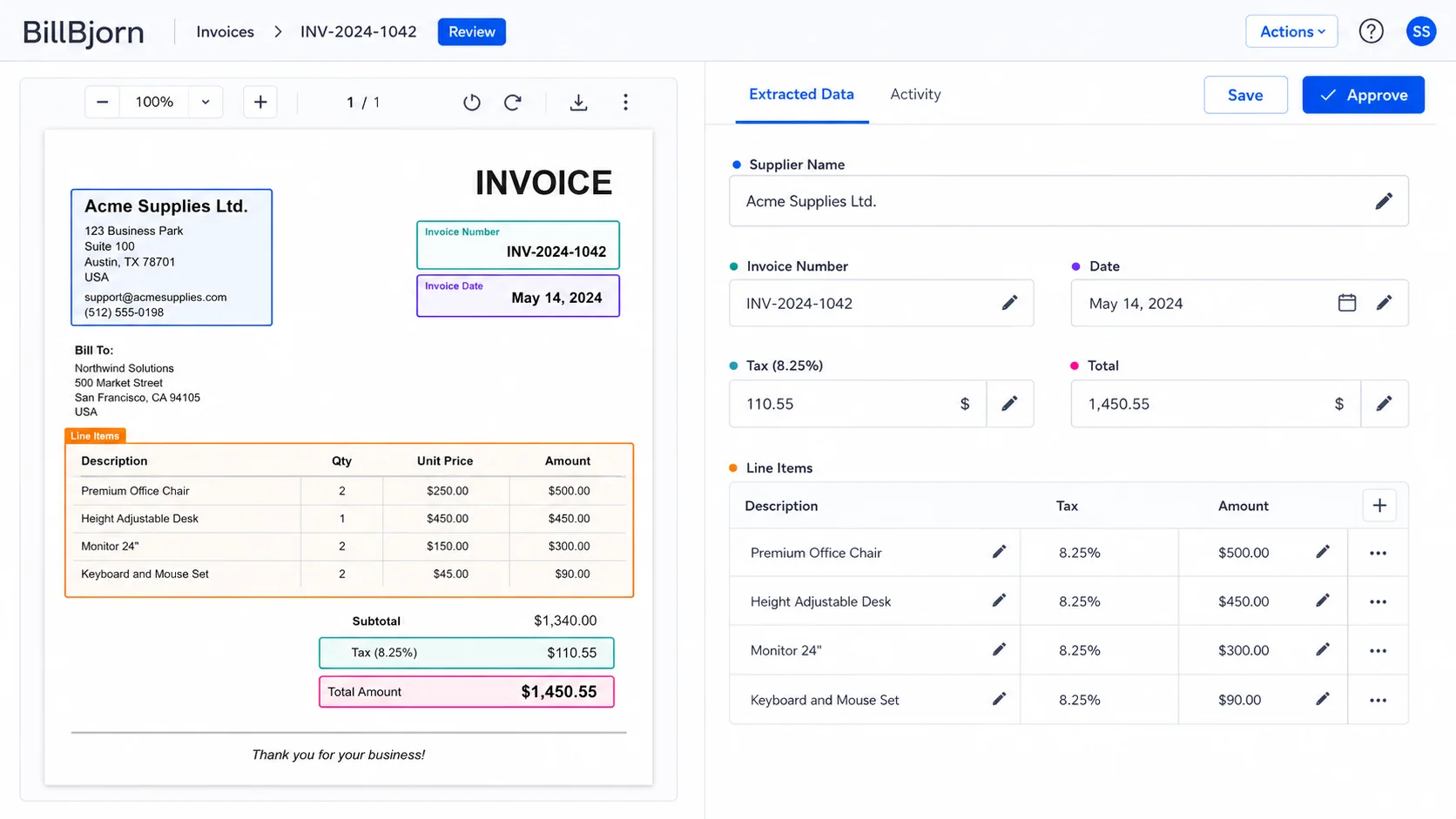 AI extracting structured fields from a scanned invoice
3. Validation Before Anything Touches Your Books
No OCR or AI model is 100% correct on every invoice, especially with unusual layouts, low-quality scans, or handwritten notes. That's why a validation step matters: extracted data should be presented next to the original document for a quick human check before it's posted anywhere.
This is also where customizable rules and templates earn their keep. Rules let you lock in known patterns for a specific supplier, for example, always mapping a particular vendor's invoices to a specific expense account, or applying a specific tax treatment automatically. AI gets you most of the way there on every invoice; rules push recurring, known suppliers toward consistent, predictable results without re-reviewing the same pattern every time.
The best setups combine both: AI for flexible, general-purpose extraction, and rules as a backstop for the invoices you see every week.
4. Accounting Categorisation: Turning Line Items Into Coded Transactions
Extraction gets you the raw data. Categorisation is what makes that data usable in a set of books. Every line item needs to become an accounting line: mapped to an account, a tax rate, and, for businesses that track cost centers or projects, a tracking category.
Done manually, this is where a lot of bookkeeping time actually goes, especially for suppliers whose invoices mix categories. A single catering invoice might include food, packaging, cleaning supplies, and a delivery charge, all needing different account codes.
This is exactly the gap BillBjorn AutoCode is built to close. Instead of exact-match keyword rules that break the moment a supplier changes their wording, AutoCode uses AI Matching Hints, short phrases like "food" or "freight", to understand the accounting intent behind a line item, then groups related lines and suggests accounts, tax rates, and tracking categories based on your actual Xero chart of accounts. You can read the full breakdown in how BillBjorn splits invoice lines automatically.
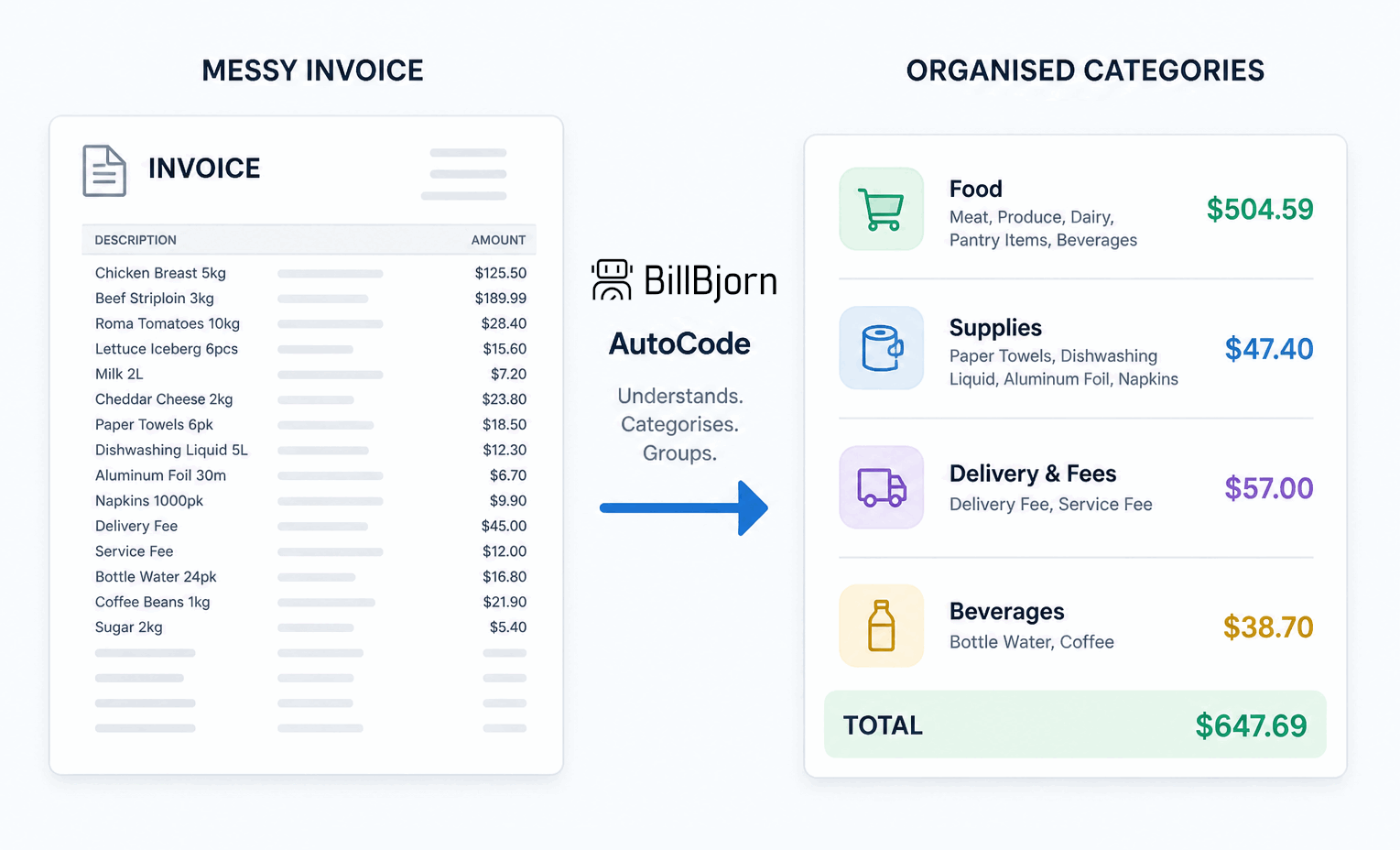 Messy invoice lines grouped into clean accounting categories
5. Export to Your Accounting Software
Once reviewed, the transaction should go to your accounting platform with one click, not a re-typed manual entry. A solid export step will:
- Create the bill or expense transaction directly in the connected platform
- Attach the original source document for audit support
- Preserve supplier, tax, and line-item detail rather than collapsing everything into a single total
- Use the accounting platform's own contacts, accounts, and tax rates, so nothing needs to be re-mapped by hand
BillBjorn connects directly to QuickBooks Online, Xero, Sage Accounting, MYOB Business, and FreshBooks, so the extracted, reviewed data lands directly as a bill, with the source PDF attached for your records.
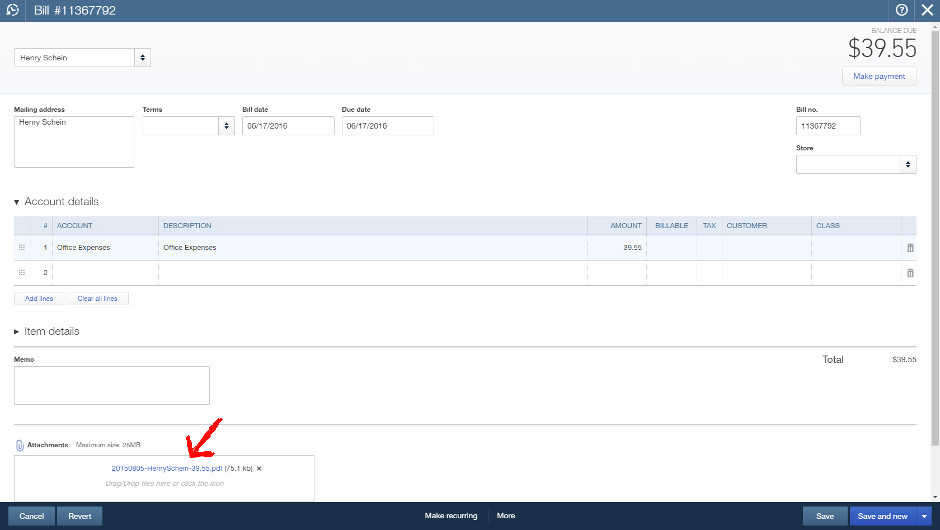 Reviewed invoice exported to accounting software with source document attached
See the Full Workflow in Action
Upload an invoice, watch AI extract the data, and send it to your accounting software in minutes.
Start Your Free 30-Day TrialBeyond the Basics: What Else Matters for Bookkeepers
A few other capabilities tend to separate "good enough" invoice OCR from tools that actually hold up in day-to-day bookkeeping work:
- Side-by-side review — a split-screen view showing the source document next to the extracted data panel, so you can cross-check details without switching tabs or windows.
- Multi-currency support — for businesses buying from overseas suppliers, correctly extracting the invoice currency and applying the right exchange rate matters for accurate books. See our guide on handling multicurrency bills in QuickBooks Online for more detail on why this trips up manual entry so often.
- Multi-user and multi-client support — bookkeepers managing several clients need one account that can handle multiple companies and connected accounting files, not a separate login per client.
- A mobile app for capturing receipts and invoices on the go, so field expenses don't sit in someone's camera roll until month-end.
These aren't exotic features. They're the details that determine whether a tool fits into a real bookkeeping workflow or just becomes another disconnected app.
Do You Need a Full AP Automation Platform, or Just Reliable Extraction?
Here's where it's worth being honest about the market. There's a category of expensive, end-to-end accounts payable (AP) automation platforms built for mid-size and large organizations: multi-step approval chains, purchase order three-way matching, vendor payment processing, consolidated multi-entity reporting, and complex role-based workflows.
Those platforms solve real problems, for the businesses that actually have those problems.
But most bookkeepers and small businesses aren't running a 12-step approval chain across a dozen departments. What they actually need is much simpler: get the invoice data out accurately, and get it into the accounting software cleanly. Paying for a platform built around enterprise AP workflows to do that one job well means paying for, configuring, and learning a lot of functionality that never gets used.
This is the same trade-off we've written about when comparing BillBjorn to Dext as a full-featured bookkeeping platform: a comprehensive tool isn't wrong, it's just built for a different job. If your workflow is genuinely "capture the invoice, extract the data, push it to my accounting software," a focused tool does that job faster, with a shorter learning curve, and at a fraction of the cost of an enterprise AP suite.
BillBjorn is built around exactly that scope:
- AI-powered OCR extraction of supplier, dates, tax, totals, and line items
- AI-assisted accounting categorisation with AutoCode
- Direct export to QuickBooks Online, Xero, Sage Accounting, MYOB Business, and FreshBooks
- Multi-user, multi-client support for bookkeepers managing several businesses
- No employee expense management, no purchase order matching, no client portals, no consolidated practice dashboards
That focus keeps setup to minutes rather than days, and keeps pricing predictable and volume-based rather than scaled around enterprise workflow features you'll never touch.
A Practical Example: One Invoice, Start to Finish
To make this concrete, here's what the process looks like for a single supplier invoice in BillBjorn:
- Arrival — an office supplies invoice is forwarded from email to BillBjorn's inbound address.
- Extraction — AI reads the document and extracts supplier name, invoice number, date, currency, tax, total, and each individual line item within seconds.
- Review — the invoice appears in the side-by-side review screen, source document on one side, extracted fields on the other, ready for a quick check.
- Categorisation — AutoCode groups the line items (say, stationery and cleaning supplies bundled on one invoice) and suggests the correct accounts and tax rates based on the connected Xero chart of accounts.
- Export — with the coding confirmed, the bill is sent to Xero in one click, with the original PDF attached to the transaction.
What used to take several minutes of manual typing and account lookups now takes a quick review and a single click.
Automate Your Invoice Data Entry Today
Connect your accounting software, forward a few invoices, and see the extraction accuracy for yourself. No credit card required.
Start Your Free 30-Day TrialGetting Started
If manual invoice data entry is eating into billable hours or admin time, the fastest way to evaluate AI-based automation is to try it against your own real invoices rather than a demo.
- Sign up for a free 30-day trial
- Connect your accounting platform: QuickBooks Online, Xero, Sage, MYOB, or FreshBooks
- Forward, upload, or photograph a handful of real supplier invoices
- Review the extracted data side-by-side with the source document
- Send the reviewed bills to your accounting software and see the export land with the source document attached
If you're currently paying for a larger AP platform and only using its document capture features, it's worth comparing what you'd save with a focused tool. Our Dext comparison walks through that trade-off in detail.

Frequently asked questions
Common questions about automating invoice data entry with AI, from extraction accuracy to accounting exports. For more details, visit our knowledge base.
What is AI invoice data entry?
AI invoice data entry uses optical character recognition (OCR) combined with machine learning and AI models to automatically read a supplier invoice and extract structured data, such as supplier name, invoice number, dates, currency, tax, totals, and line items, without a person retyping it.
How accurate is AI invoice data extraction?
Modern AI-powered OCR typically reaches 95-99% field accuracy out of the box, and can be pushed toward 100% by combining AI extraction with supplier-specific rules and templates that handle recurring formats consistently.
Can AI invoice data entry handle line items, not just totals?
Yes. Good invoice automation tools extract individual line items, not just the invoice total, and can group and categorise those lines against your chart of accounts, which matters for accurate expense coding and tax reporting.
Do I need a full AP automation platform to automate invoice data entry?
No. Many businesses only need reliable data extraction and a clean export into their accounting software, not a full accounts payable platform with approval chains, purchase order matching, and payment processing. A focused tool like BillBjorn can be a simpler, more affordable fit for bookkeepers and SMBs.
Which accounting platforms can AI-extracted invoice data be exported to?
BillBjorn exports extracted invoice data directly to QuickBooks Online, Xero, Sage Accounting, MYOB Business, and FreshBooks, attaching the original source document to the transaction for audit support.
How do invoices get into an AI data entry system in the first place?
Typically by forwarding invoices from email, uploading files or PDFs through a web interface, dragging and dropping documents, snapping a photo with a mobile app, or using a desktop watched-folder app that automatically picks up files from a scanner or cloud storage folder.