Best
Accounts Payable Software for Small Business
Trusted Partner App for Leading Cloud-Based Accounting Software

TL;DR: Most small businesses don't need an enterprise AP platform, so they don't need to pay an enterprise price. QuickBooks Online and Xero already pay bills by free standard ACH. What they don't remove is the typing and checking of every bill. A capture app like BillBjorn does that from US$13 a month at 200 bills, with line items. Add QuickBooks Bill Pay Elite (US$45) or Melio (US$80 unlimited) if several people approve bills. Choose BILL, Ramp, Tipalti or Stampli when you need PO matching, approval policies, global payments or an ERP.
Last updated: November 16, 2026. Prices are US list prices on monthly billing, excluding tax, from each vendor's website on November 16, 2026.
A note on bias: BillBjorn wrote this guide, and BillBjorn is on the list. We used each vendor's own pricing pages, and we say where another tool fits better, including the jobs BillBjorn doesn't do.
What is accounts payable software?
Accounts payable (AP) software handles the bills your business owes its suppliers, from the moment a bill arrives until it's paid and recorded. It does up to five jobs:
- Capture: get the bill in, from email, upload, a phone photo or a scanner
- Code: read the supplier, dates, totals, tax and line items, and assign accounts and tax codes
- Approve: someone signs off before money moves
- Pay: send the money to the supplier by ACH, check, card or wire
- Sync: record the bill and the payment in your accounting software
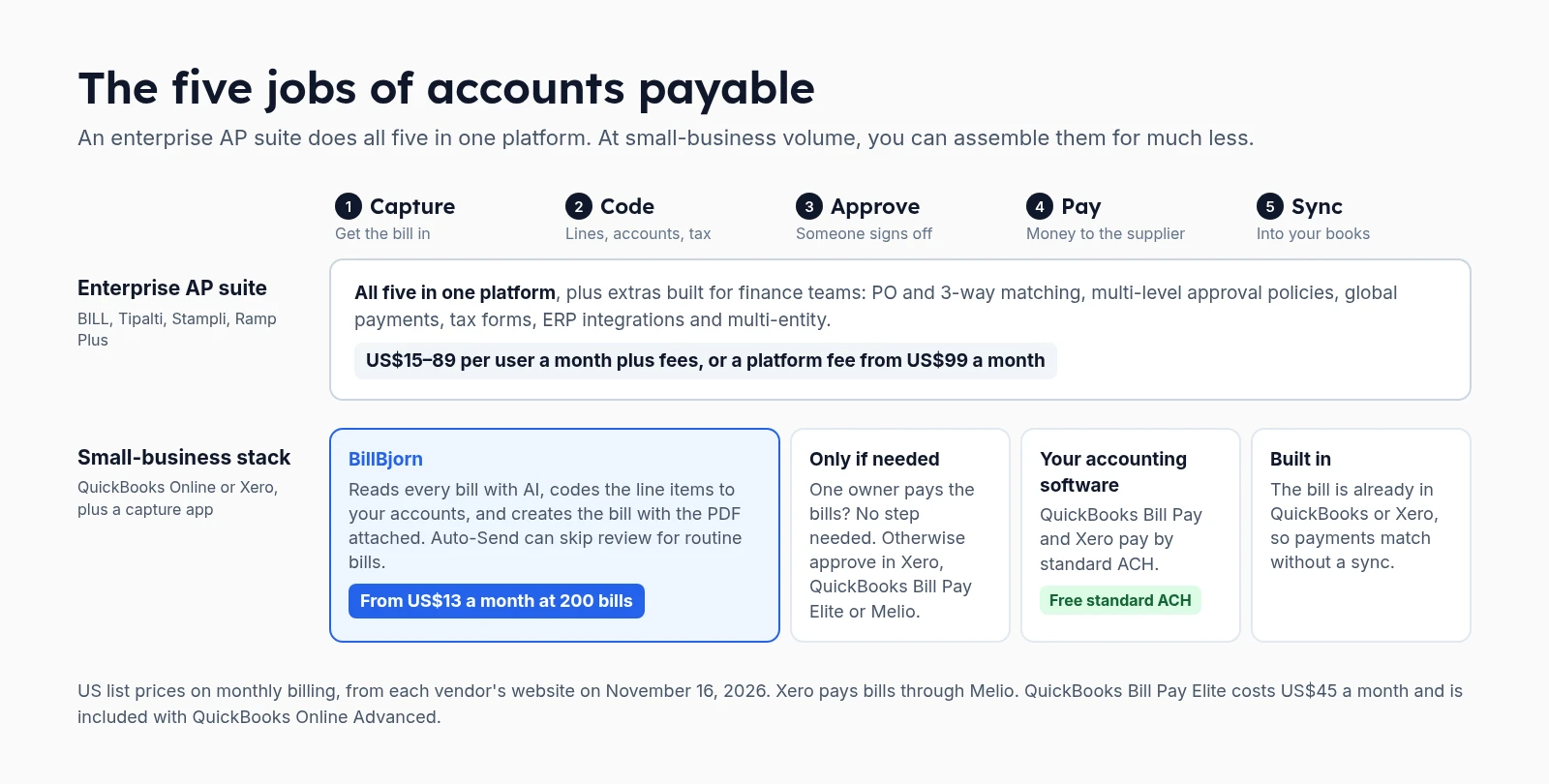 The five jobs of accounts payable
Enterprise AP suites do all five in one platform and add what finance teams need: purchase orders and 3-way matching, multi-level approval policies, mass and international payments, supplier tax forms, multi-entity and ERP integrations.
A small business usually needs less. If you're on QuickBooks Online or Xero, paying and syncing are already covered: both pay bills by free standard ACH, and the bill is already in your books. The job that still costs hours is the first two: typing bills in and checking them.
Do you need enterprise AP software?
Enterprise features are priced for enterprise problems. Before you compare platforms, count which of these you actually have:
| You need an AP suite if… | A small-business setup is enough if… |
|---|---|
| You use purchase orders and match bills to POs and receipts | You don't use purchase orders |
| Bills go through several approvers, with rules by amount or department | One or two people approve, or the owner pays the bills |
| You pay many international suppliers or mass payouts | Most suppliers are paid domestically by ACH |
| You collect W-9/W-8 forms from hundreds of suppliers | You file a handful of 1099s |
| You run several entities or an ERP such as NetSuite | You have one company in QuickBooks Online or Xero |
If most of your answers are in the right column, an enterprise platform charges you for features you won't use. BILL Team, for example, costs US$65 per user a month, plus US$0.59 per ACH payment.
The best accounts payable software at a glance
| Software | Best for | Capture & line items | Approvals | Pays suppliers | Starting price |
|---|---|---|---|---|---|
| BillBjorn + QuickBooks or Xero | Small businesses and bookkeepers whose bottleneck is data entry | Yes, line items coded from Small | Not in BillBjorn; in Xero, Bill Pay Elite or Melio | No: pay in QuickBooks or Xero | US$6.50/mo; US$13 at 200 bills |
| QuickBooks Bill Pay | QuickBooks Online users paying domestic suppliers | AI bill creation with line items, for review | Elite only | Yes, free standard ACH | Included; Elite US$45/mo |
| Xero bills | Xero users on Growing or Established | Smart Document Capture, drafts | Yes | Yes, free standard ACH (via Melio) | Included in Xero plans |
| Melio | Paying bills from any accounting software, cheaply | AI bill capture | Core and up | Yes | Free; Unlimited US$80/mo |
| BILL | Growing teams that want AP and AR in one place | AI multi-line coding on Team and up | Yes | Yes, US$0.59 per ACH | US$49 per user/mo |
| Ramp | Startups and teams already using Ramp cards | OCR; line items on Plus | Yes | Yes, free same-day ACH | Free; Plus US$15 per user + platform fee |
| Tipalti | Global supplier payments and tax compliance | Yes | Yes | Yes, 200+ countries | From US$99/mo + fees |
| Stampli | Mid-size finance teams with POs and an ERP | Yes, AI agent | Yes | Yes | Quote only |
1. BillBjorn: best for small businesses whose bottleneck is data entry
BillBjorn does the first two jobs of AP, and does them for much less than an AP suite. It reads every supplier bill with AI, codes each line to your accounts and tax codes, and creates the bill in QuickBooks Online, Xero, Sage Accounting, MYOB Business or FreshBooks with the PDF attached. You then pay in your accounting software as usual.
What stands out
- Line items with Auto-Code from the Small plan. A bill counts as one document however many lines it has.
- Supplier rules fill in the same account, tax code and tracking for regular suppliers. In Xero, bills can arrive already approved on every plan.
- Auto-Send (Medium and Large) sends routine bills without anyone opening them, after checking each one: the supplier exists, the totals add up, the accounts and tax codes are valid, the amount is under your limit and it isn't a duplicate. Anything else is held, with the reason.
- Every way in: a bills email address per company, a mobile app, upload, and desktop scanning with Scan2Invoice.
- Unlimited users on every plan, so a bookkeeper and two staff cost the same as one.
- Rated 4.8 out of 5 from 59 reviews on the QuickBooks App Store and 4.9 out of 5 from 24 on the Xero App Store.
Pricing: Solo US$6.50 a month for 50 documents (US$5 billed yearly), Small US$13 for 250 (US$10), Medium US$26 for 1,000 (US$20), Large US$65 for 2,500 (US$50). 30-day free trial, no credit card. See pricing.
Where it falls short: BillBjorn doesn't pay bills and has no multi-step approval workflow. No purchase orders, no QuickBooks Desktop. Line items need Small or above; Auto-Send needs Medium or above.
Choose it if you're on QuickBooks Online or Xero, the time goes into entering and checking bills, and you're happy paying them where you already do.
2. QuickBooks Bill Pay: best for QuickBooks Online users paying domestic suppliers
Intuit's QuickBooks Bill Pay pays bills from inside QuickBooks Online. The standard Bill Pay tier is included in your subscription, with free standard ACH. Checks cost US$1.50, and instant payments 1% (up to US$100). Intuit's plan table lists AI bill creation with line items, which pre-fills bills for you to review and save.
- Bill Pay Premium (US$15 a month) adds unlimited 1099 e-filing.
- Bill Pay Elite (US$45 a month) adds roles, bill approval automation and payment release approvals. Since August 1, 2026 it's included with QuickBooks Online Advanced.
Where it falls short: bills still arrive for review one by one, and approvals need Elite. It works only with QuickBooks Online. More on its capture: can QuickBooks Online scan invoices?
Choose it if you're on QuickBooks Online and pay domestic suppliers. Pair it with BillBjorn to skip review for routine bills.
3. Xero bills: best for Xero users on Growing or Established
Xero handles AP inside the accounting software: Smart Document Capture creates draft bills, you approve them, and Xero pays them through Melio, with free standard ACH on its Early, Growing and Established plans. Checks cost US$1.50; same-day ACH 1% (up to US$75).
Where it falls short: the Early plan (US$27 a month) lets you enter only 5 bills, so at 200 bills you need Growing (US$59) or Established (US$97). Every captured bill arrives as a draft to approve. See Xero draft bills vs Awaiting Payment.
Choose it if you're on Xero Growing or above. Pair it with BillBjorn to have routine bills arrive approved, with line items.
4. Melio: best for paying bills cheaply, from any accounting software
Melio is a bill payment platform that syncs with QuickBooks Online and Xero, and includes AI bill capture on every plan.
Pricing: Go is free for 1 user with 5 free ACH payments a month, then US$0.50 each. Core US$25 a month (20 free ACH), Boost US$55 (50 free ACH), and Unlimited US$80 for unlimited users and ACH payments. Extra users on Core and Boost cost US$10 a month each. Custom approval workflows start with Core. Checks cost US$1.50, wires US$10 and card payments 2.9%.
Where it falls short: at 200 bills, Core and Boost run past their free ACH quotas, so Unlimited is the sensible plan. Melio pays bills; it isn't built for coding complex line items.
Choose it if you want approvals and cheap payments outside your accounting plan, or you pay many suppliers by card.
5. BILL: best for growing teams that want AP and AR in one place
BILL is the best-known AP platform for small and mid-size businesses, with approval workflows, payments and receivables.
Pricing: Essentials US$49 per user a month, with QuickBooks Online and Xero sync only by manual CSV import and export. Team US$65 per user adds automatic two-way sync and AI multi-line bill coding. Corporate US$89 per user adds custom approval policies. ACH payments cost US$0.59 each, checks US$1.99, and virtual card payments are free.
Where it falls short: per-user pricing plus per-payment fees. At 200 bills and 3 users on Team, that's about US$313 a month before any check fees.
Choose it if you need approvals, payments and receivables in one platform, and several people work in it every day.
6. Ramp: best for teams already using Ramp cards
Ramp combines corporate cards, expenses and bill pay. Ramp Free includes invoice OCR, configurable approval workflows, QuickBooks Online and Xero integrations, and free same-day ACH and wires through Bill Pay.
Ramp Plus (US$15 per user a month, plus a platform fee based on team size that Ramp doesn't publish) adds auto-coded line items, batch payments, multi-entity and more integrations.
Where it falls short: Ramp Free is aimed at smaller teams, and Ramp's corporate card is subject to credit approval, so check eligibility before you plan around it. Line-item coding needs Plus, whose platform fee isn't published.
Choose it if you already use Ramp, or want cards, expenses and bill pay from one provider and qualify for an account.
7. Tipalti: best for global supplier payments
Tipalti automates AP end to end and is strongest when you pay suppliers abroad: payments to 200+ countries, FX, W-9/W-8 collection, a supplier portal, PO matching and ERP integrations.
Pricing: the Accounts Payable plan starts at US$99 a month, with unlimited users. Fees per invoice and per payment come on top and aren't published; the final price is a quote.
Where it falls short: more platform than a small domestic business needs, and the total cost is only clear after a sales call.
Choose it if international payments and supplier tax compliance are your real problem.
8. Stampli: best for mid-size finance teams with POs and an ERP
Stampli puts collaboration on each invoice at the center, with an AI agent for coding, 2- and 3-way PO matching, unlimited entities and vendors, and a dedicated customer success manager.
Pricing: quote only; no prices are published.
Where it falls short: built and priced for finance teams, not for a small business with one bookkeeper.
Choose it if you have purchase orders, an ERP and an AP team.
Also worth knowing: Dext captures bills, receipts and bank statements for accounting practices, and ApprovalMax adds multi-step approvals to Xero, QuickBooks Online and NetSuite. Neither pays suppliers.
What accounts payable costs at 200 bills a month
Our example: 200 supplier bills a month, 3 users, every bill paid by standard ACH. Monthly list prices for the AP software plus payment fees. Your QuickBooks Online or Xero plan isn't included.
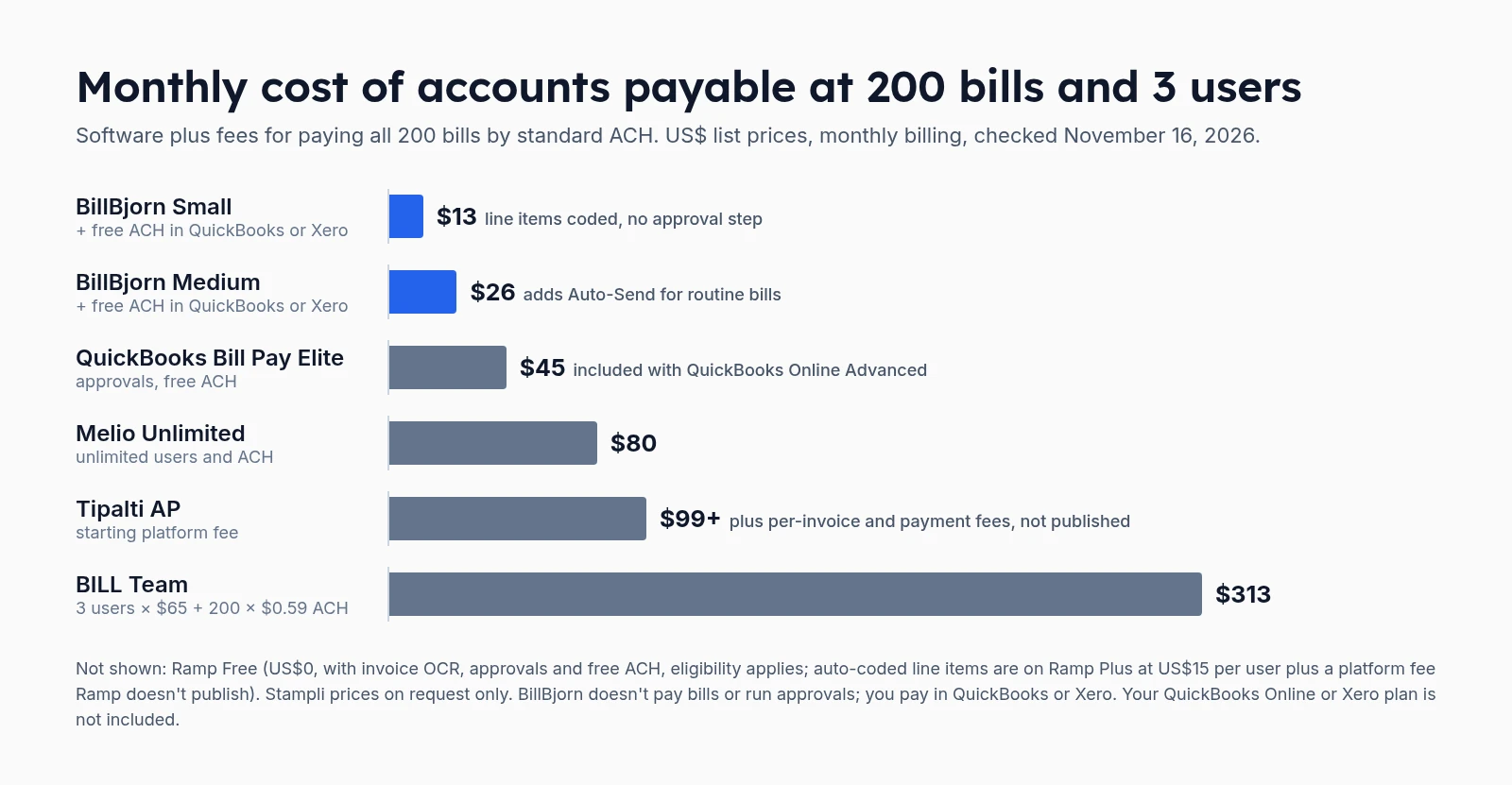 Monthly cost of accounts payable at 200 bills and 3 users
| Setup | Software | ACH fees (200 payments) | Monthly total | What you get |
|---|---|---|---|---|
| BillBjorn Small + QuickBooks Bill Pay or Xero | US$13 | US$0 | US$13 | Capture, line items coded, free ACH. No approval step |
| BillBjorn Medium + QuickBooks Bill Pay or Xero | US$26 | US$0 | US$26 | Adds Auto-Send: routine bills without review |
| BillBjorn Small + QuickBooks Bill Pay Elite | US$13 + US$45 | US$0 | US$58 | Adds approvals and payment release approval |
| QuickBooks Bill Pay Elite | US$45 | US$0 | US$45 | AI bill creation for review, approvals |
| Melio Unlimited | US$80 | US$0 | US$80 | Unlimited users and ACH, approvals |
| Tipalti AP | From US$99 | Not published | US$99+ | Global payments, tax forms, supplier portal |
| BILL Essentials (3 users) | US$147 | US$118 | US$265 | Approvals and payments; CSV sync only |
| BILL Team (3 users) | US$195 | US$118 | US$313 | Adds two-way sync and AI bill coding |
| Ramp Free | US$0 | US$0 | US$0 | OCR, approvals, free ACH; eligibility applies; line items need Plus |
| Stampli | Quote | Quote | Quote | Not published |
Over a year, the gap between BillBjorn Small with free ACH and BILL Team is about US$3,600. That's the enterprise price tag, for features most small businesses never switch on.
Billed yearly, BillBjorn is cheaper still: US$10 a month for Small and US$20 for Medium.
Which accounts payable setup fits you?
- Owner pays the bills, on QuickBooks Online or Xero: BillBjorn for capture and coding, and pay by free ACH in QuickBooks Bill Pay or Xero. From US$13 a month.
- The same suppliers every month: BillBjorn Medium with Auto-Send, so routine bills go through without anyone opening them, checked first. US$26 a month.
- A bookkeeper prepares, the owner approves: add QuickBooks Bill Pay Elite, or approve bills in Xero. On Xero, BillBjorn can send bills as drafts for the approver.
- You pay many suppliers by card, or your accounting software has no bill pay: Melio.
- Approvals, payments and receivables for a growing team: BILL.
- You already use Ramp cards: Ramp.
- International suppliers and tax forms: Tipalti.
- POs, an ERP and an AP team: Stampli or Tipalti.
Comparing capture tools only? See the best invoice scanning software and the cost per invoice at higher volumes.

Take the Typing Out of Accounts Payable
Connect QuickBooks Online or Xero, forward a few bills and see every line coded. Keep paying the way you do now. No credit card required.
Start Your Free 30-Day Trial
Frequently asked questions
Common questions about accounts payable software for small businesses. For setup help, visit our knowledge base.
What is accounts payable software?
Accounts payable (AP) software handles the bills a business owes its suppliers. It does up to five jobs: capturing each bill, coding it to your accounts, getting it approved, paying the supplier and syncing everything to your accounting software. Enterprise AP suites do all five in one platform; small businesses often combine a capture app with the bill payments already in QuickBooks Online or Xero.
What is the best accounts payable software for a small business?
It depends on where the work is. If the bottleneck is typing bills in, a capture app such as BillBjorn (from US$13 a month at 200 bills, with line items) plus the free standard ACH payments in QuickBooks Bill Pay or Xero covers most small businesses. If several people must approve bills, add QuickBooks Bill Pay Elite (US$45 a month) or Melio. BILL, Ramp, Tipalti and Stampli suit finance teams that need PO matching, multi-level approval policies, global payments or ERP integrations.
How much does accounts payable software cost?
For a small business with 200 bills a month and 3 users, list prices checked on November 16, 2026 range from US$13 a month (BillBjorn Small, paying by free ACH in QuickBooks or Xero) to about US$313 (BILL Team: 3 users at US$65 plus US$0.59 per ACH payment). Melio Unlimited is US$80, QuickBooks Bill Pay Elite US$45, and Tipalti starts at a US$99 platform fee plus per-invoice and payment fees. Ramp Free is US$0 for eligible businesses. Stampli quotes on request.
Can QuickBooks Online or Xero handle accounts payable by themselves?
Mostly, at small-business volume. QuickBooks Online pays bills through QuickBooks Bill Pay, with free standard ACH; approvals need Bill Pay Elite (US$45 a month, included with QuickBooks Online Advanced). Xero pays bills through Melio, with free standard ACH on its Early, Growing and Established plans, but Early is limited to 5 bills a month. What neither removes completely is checking each bill: their built-in capture creates bills for you to review.
Do I need an enterprise AP platform?
Usually not, if you have one entity, a few hundred bills a month, domestic suppliers and one or two approvers. Enterprise platforms earn their price with purchase orders and 3-way matching, multi-level approval policies, mass or international payments, supplier tax forms, multi-entity and ERP integrations. If you don't use those, you pay for features you don't need.
Does BillBjorn pay bills?
No. BillBjorn captures bills, reads and codes every line item and creates the bill in QuickBooks Online, Xero, Sage Accounting, MYOB Business or FreshBooks with the PDF attached. You then pay in your accounting software, for example with QuickBooks Bill Pay or Xero's bill payments, or with a payment tool such as Melio.
Is this comparison neutral?
BillBjorn wrote it, so we're not neutral. We used each vendor's own pricing page, checked on November 16, 2026, and we say where another tool fits better, including where BillBjorn doesn't do a job at all.